YBK Audio: Music software made simple
Launch saleOur Products
 Free until 10/19
Standard / Pro
Instrument Player$0
Free until 10/19
Standard / Pro
Instrument Player$0 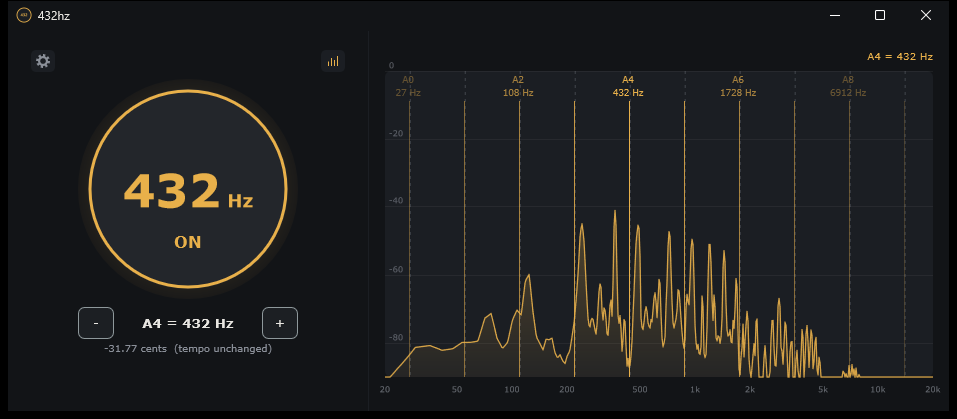 Free
432hz$0
Your whole computer sound, retuned
See 432hz →
Free
432hz$0
Your whole computer sound, retuned
See 432hz →
 7-day trial
Visualize$19
7-day trial
Visualize$19 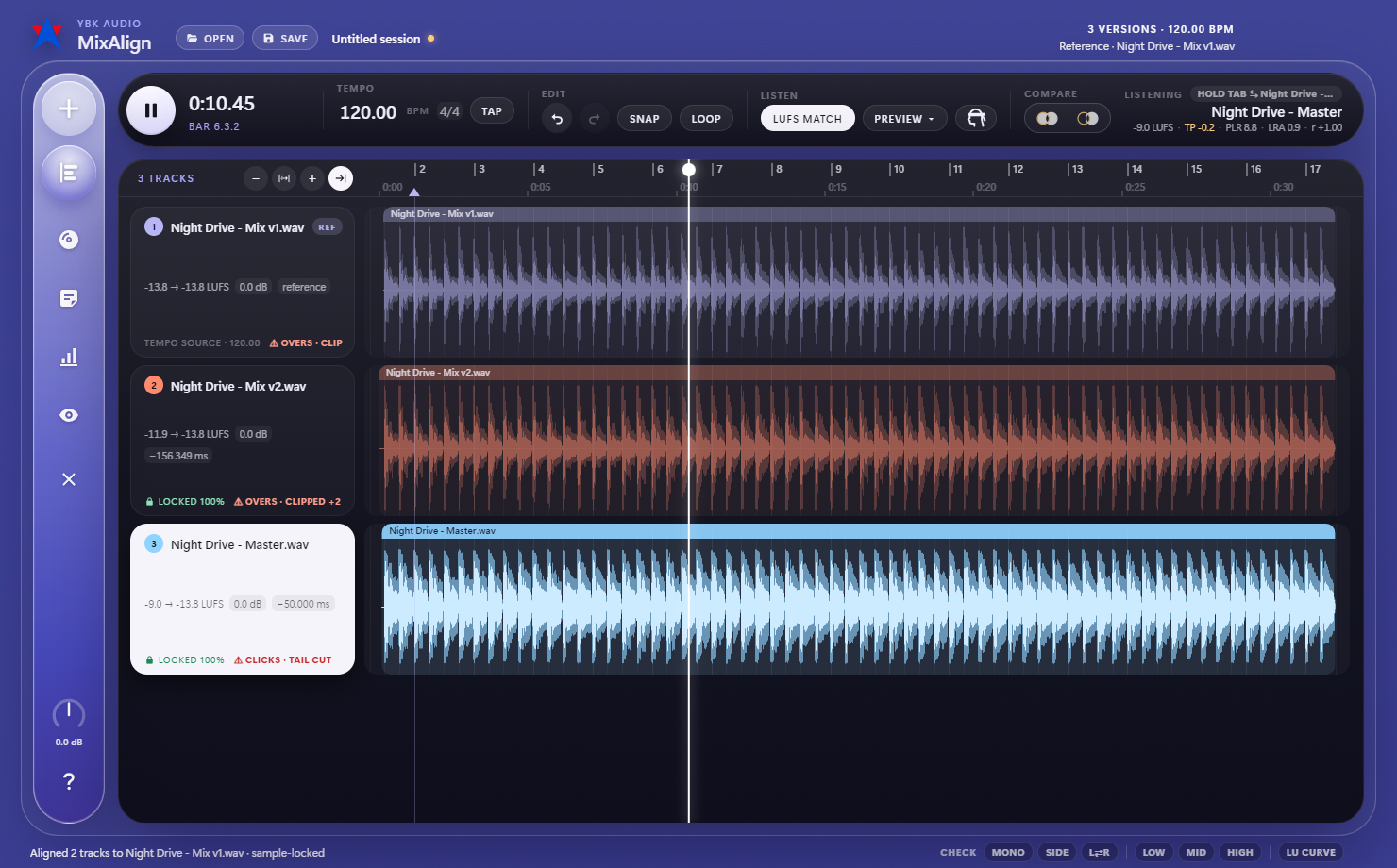 In development
MixAlign
Compare every version of your song, aligned to the sample.
See MixAlign →
In development
MixAlign
Compare every version of your song, aligned to the sample.
See MixAlign →
 In development
Beatmaker
The easiest DAW for beatmaking
See Beatmaker →
In development
Beatmaker
The easiest DAW for beatmaking
See Beatmaker →
 In development
MultiConsole
A live mixing console for your PC audio
See MultiConsole →
In development
MultiConsole
A live mixing console for your PC audio
See MultiConsole →
Hear it first.
We'll let you know when our newer apps and updates are ready.
Pick what you want to hear about. Unsubscribe any time.
Instrument Player
Why open a DAW to play an instrument?
Free launch month
Instrument Player will be free for its first month, and anyone who claims it then keeps it for good.
Starts in
Free launch month
Get Your License
Instrument Player is free for its first month. Claim a license now and it’s yours to keep; it never expires.
Updates released during the free month are included too. From October 20, new versions come with the paid app, and your free license keeps working on the last free-month version.
Free for another , then $10
Windows & Mac
Standard
- Play any VST3 instrument (plus the built-in Starter Synth), straight away
- Play from your computer keyboard or a MIDI keyboard
- MIDI Replay: bring back the last 5 minutes of playing as MIDI notes
- MIDI editor: draw, record and edit notes, with velocity and sustain pedal lanes
- Record what you play and save it as WAV, MP3 or FLAC
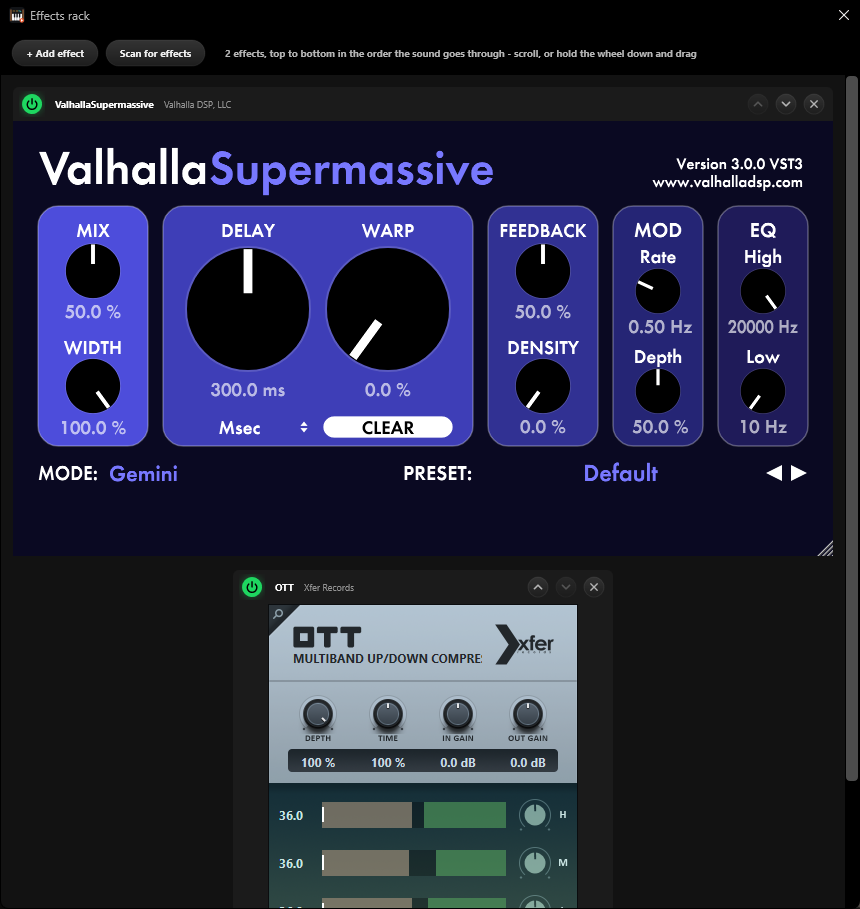
- Audio effects rack
- Save and open projects
By purchasing you agree to the Terms.
Windows
ProPro
- Pro Editor: pitch bend and mod wheel lanes, quantize strength, humanize
- MIDI Replay remembers 30 minutes
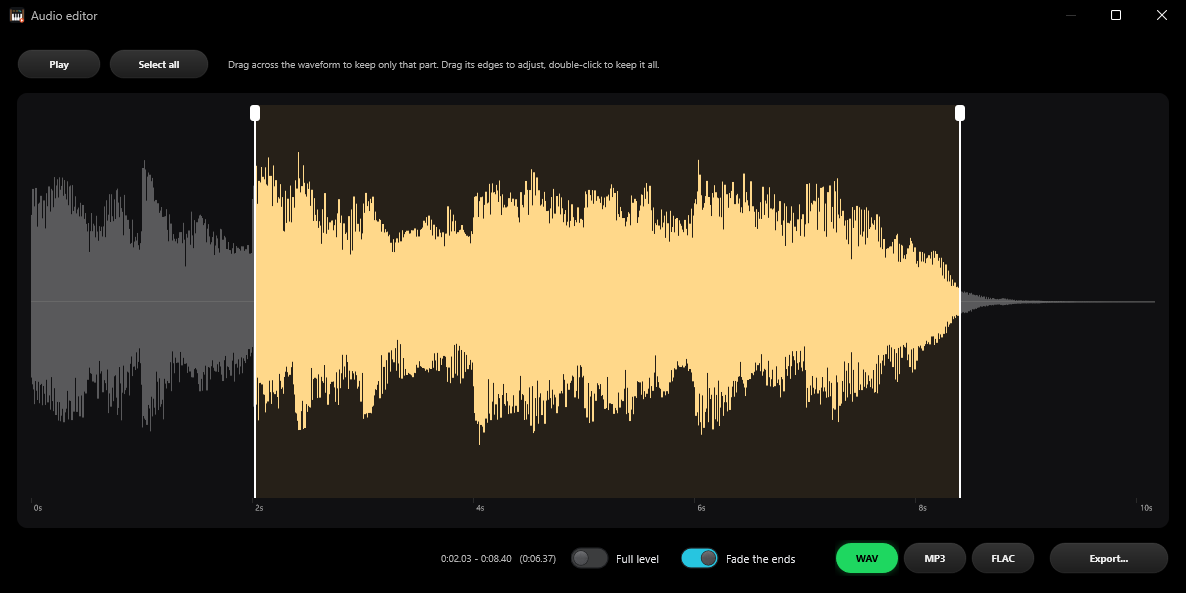
- Export audio: an audio editor to pick the part you want and save it as WAV, MP3 or FLAC
- Pro licenses can activate both standard and pro versions of instrument player.
By purchasing you agree to the Terms.
The payment window didn’t open
Our payment provider’s checkout couldn’t load. This is usually an ad or tracker blocker, or a connection that dropped for a moment. Reload the page and press Purchase again.
The payment window didn’t open
Our payment provider’s checkout couldn’t load. This is usually an ad or tracker blocker, or a connection that dropped for a moment. Reload the page and press Purchase Pro again.
What Pro addsPro
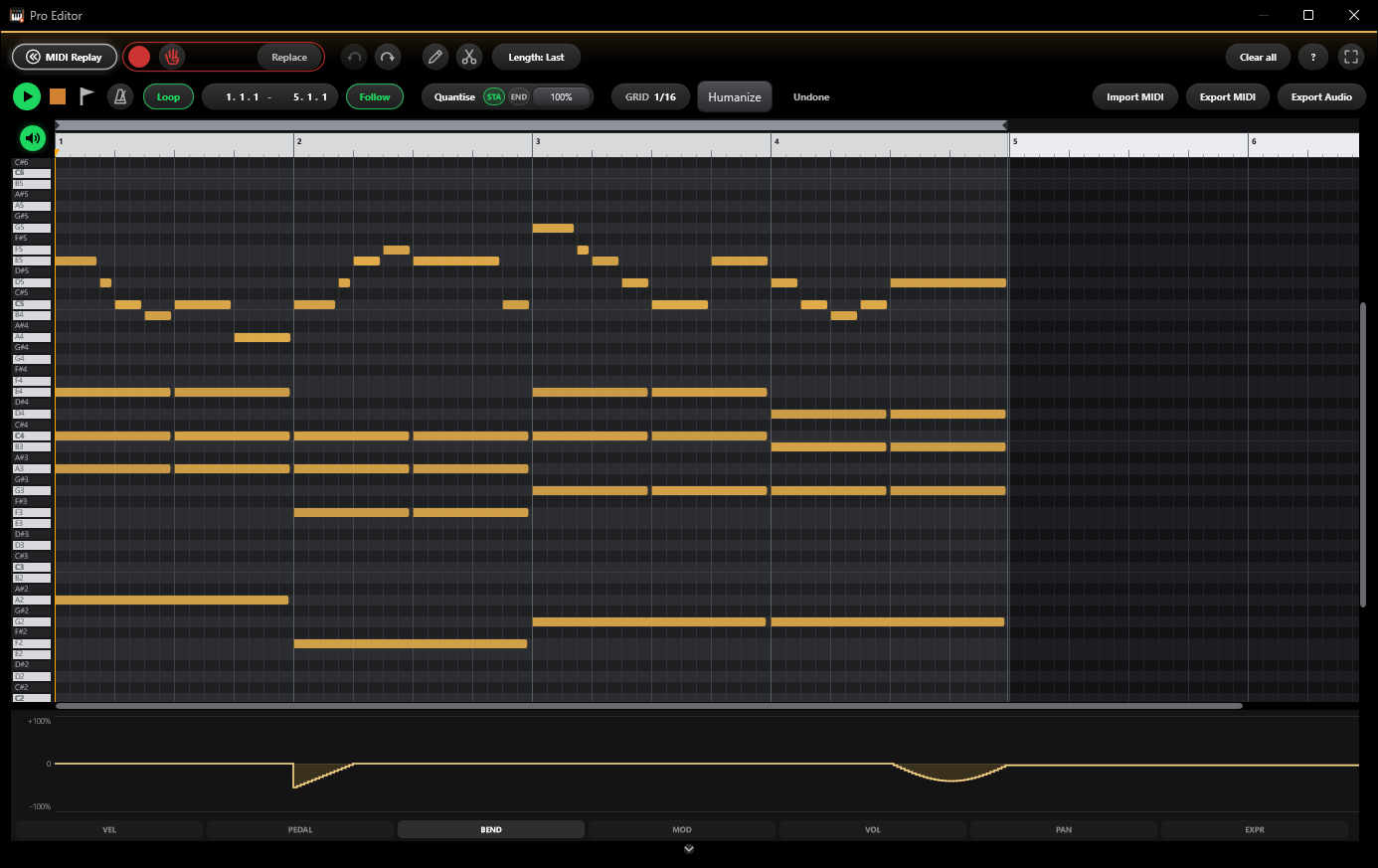
Shape every note
Pitch bend, mod wheel, volume, pan and expression lanes. Quantize strength, humanize and note length.
30 minutes, not 5
Bring back the last 30 minutes of your playing.
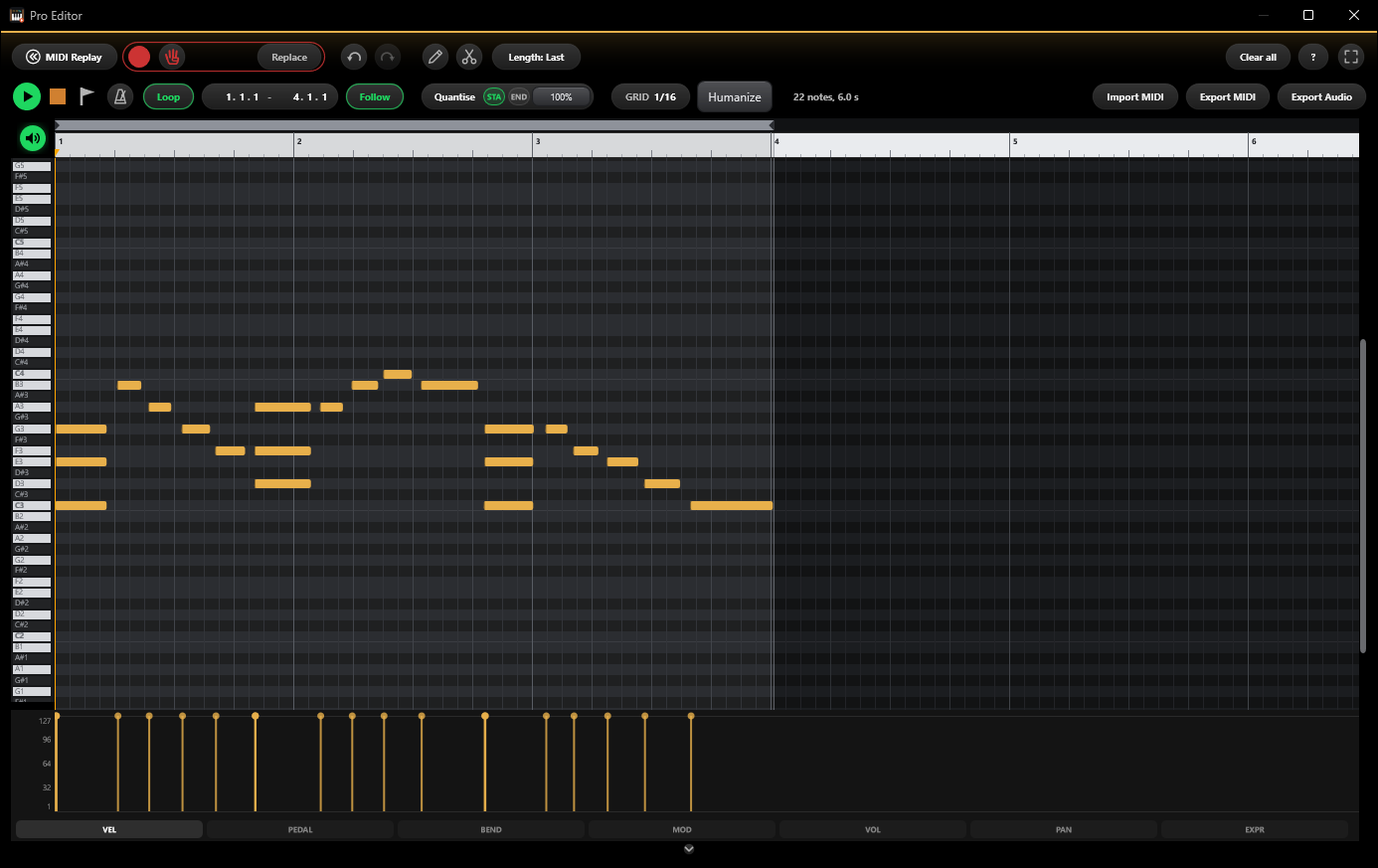
Save the part you want
Select a part in the MIDI editor and save it as audio.
More on the way
Every Pro update is included. Next: setlists, keyboard split and MIDI Learn.
Already have Instrument Player? Upgrade to Pro
Free month codes / Standard bought codes can be upgraded to Pro with half the price.
Enter your license and we'll change yours to a Pro license.
Your license keeps working after
- Resetting or reinstalling Windows on the same computer
- Windows updates, driver updates and app updates
- Swapping the drive, RAM, graphics card or monitor
- Changing your network, Wi-Fi adapter or VPN
Move your license (Settings > Release license) when you
- Replace the motherboard or CPU
- Change to a different computer
- Run the app inside a new virtual machine
- Old computer broken? Write to us and we’ll release it
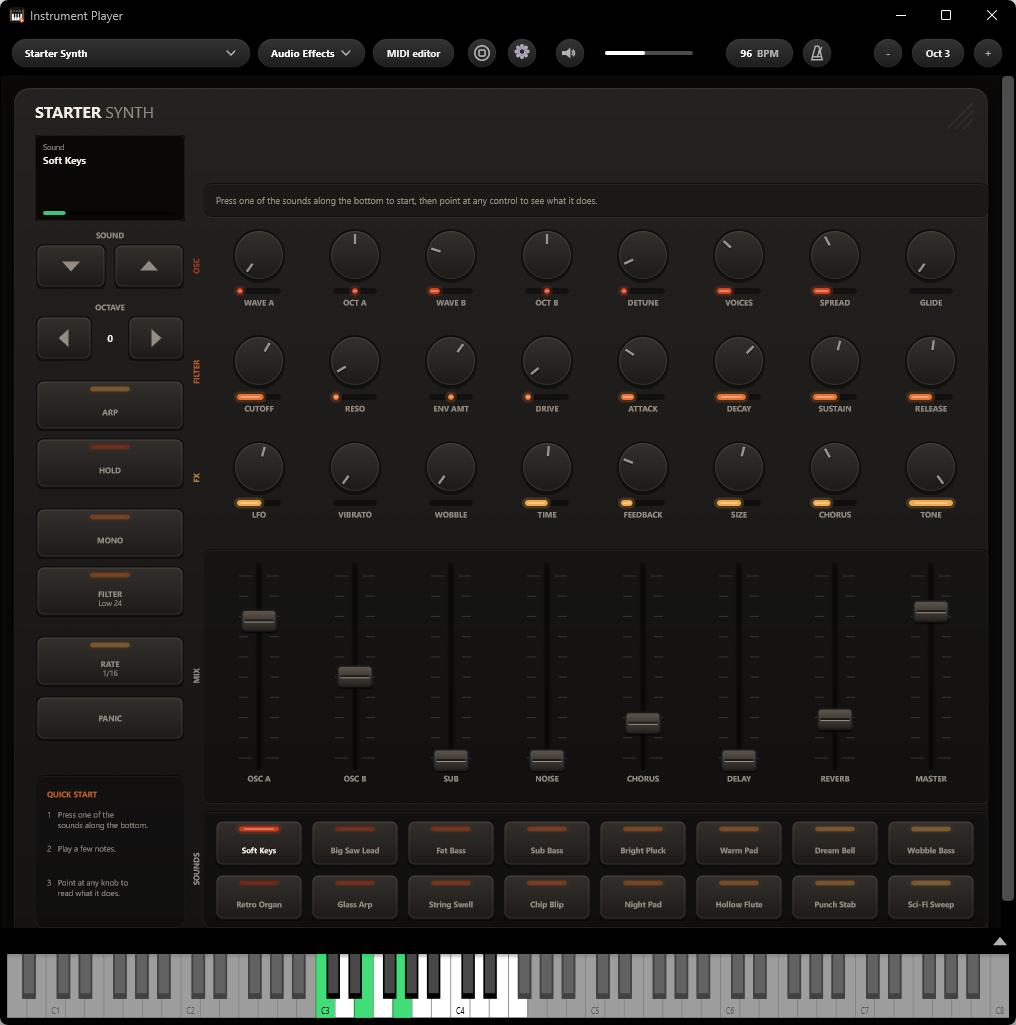
Play your VSTs without opening the DAW. Switch between massive instrument banks with little latency.
No one said idea generation had to start in a heavy DAW. Instrument Player helps you get closer to your instruments without having to enter work mode all the time.
It remembers what you play. The app provides MIDI replay, which brings back the last 5 minutes of your playing. Load up your sudden ideas and make small edits via the MIDI editor, and export the .mid file for later use.
Explore each feature
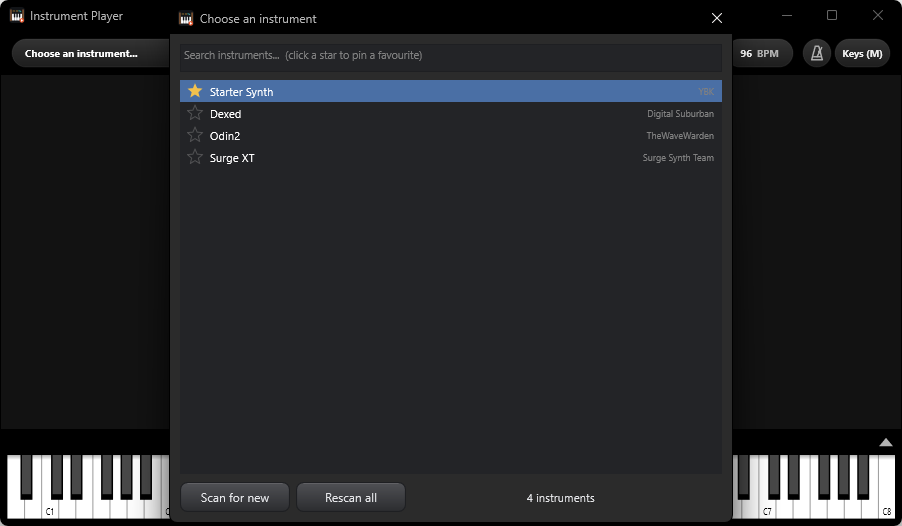
Find and play your VST instrument
Every VST3 instrument on your PC sits in one searchable list, with effects filtered out and favourites pinned to the top. Pick one and it opens at its own size, ready to play.
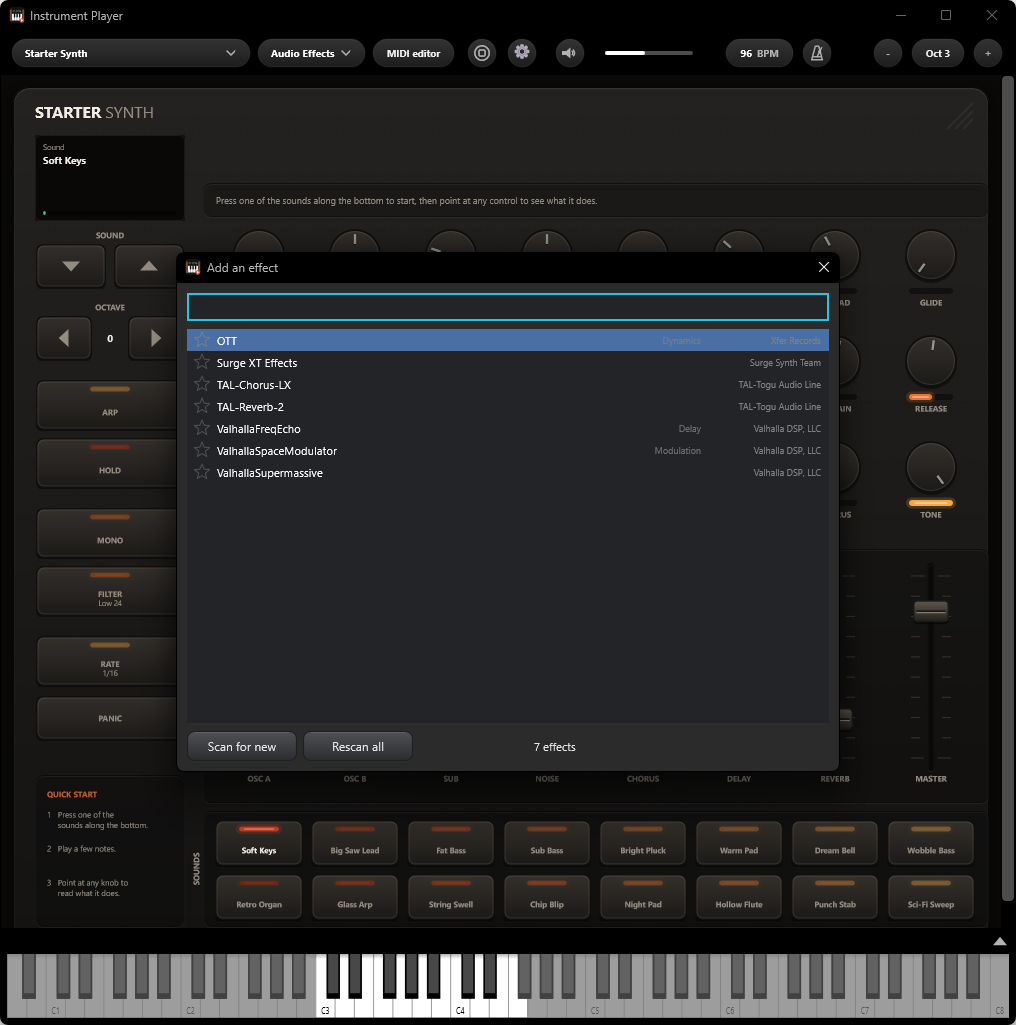
Add any VST audio effect
Chain your own VST3 effects after the instrument, in the order the sound runs through them. The list tells you what kind each effect is.
All MIDI input replayable
The last 5 minutes of your playing stay in memory, with nothing to arm or press. What you played while warming up is still there, note for note.
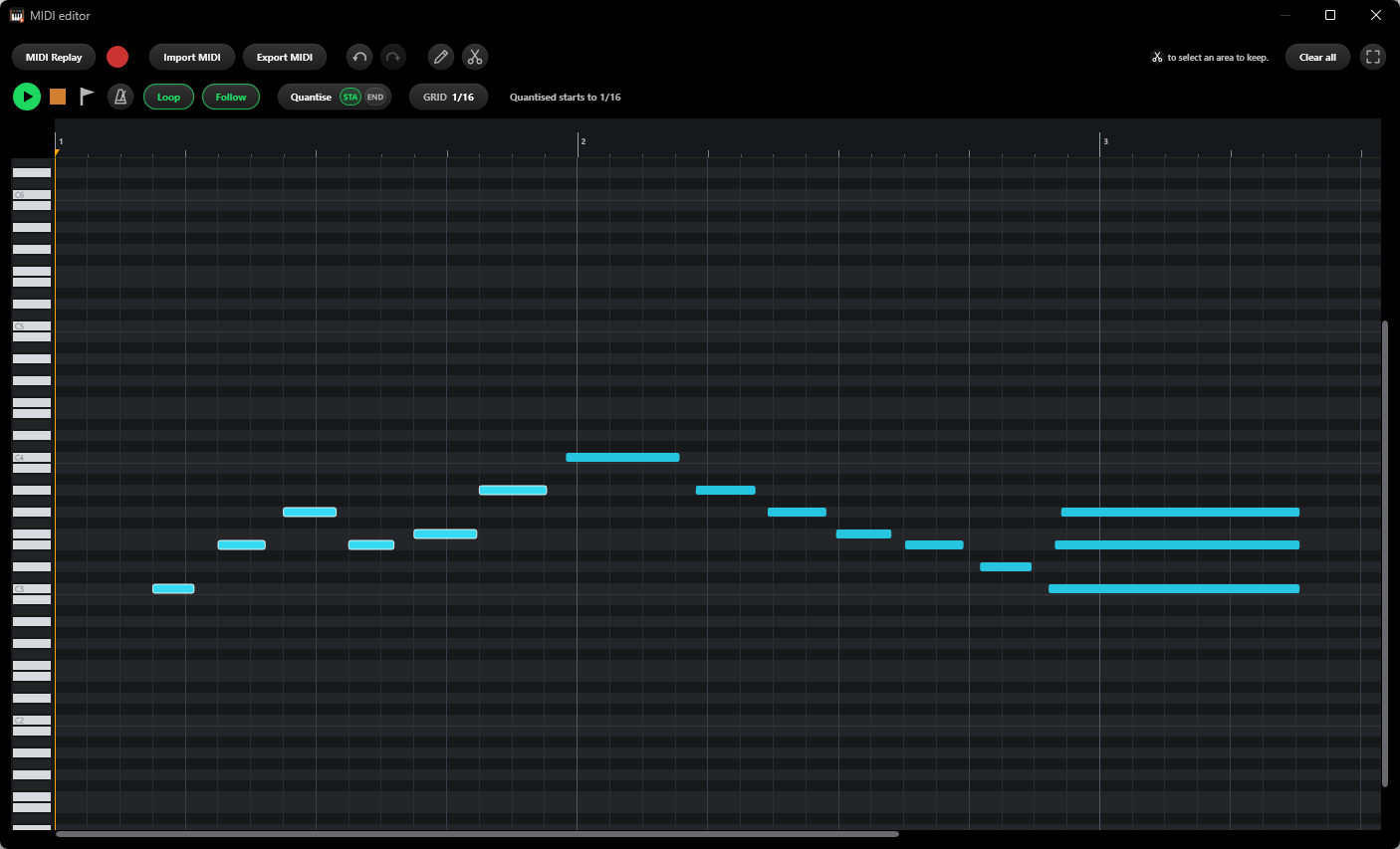
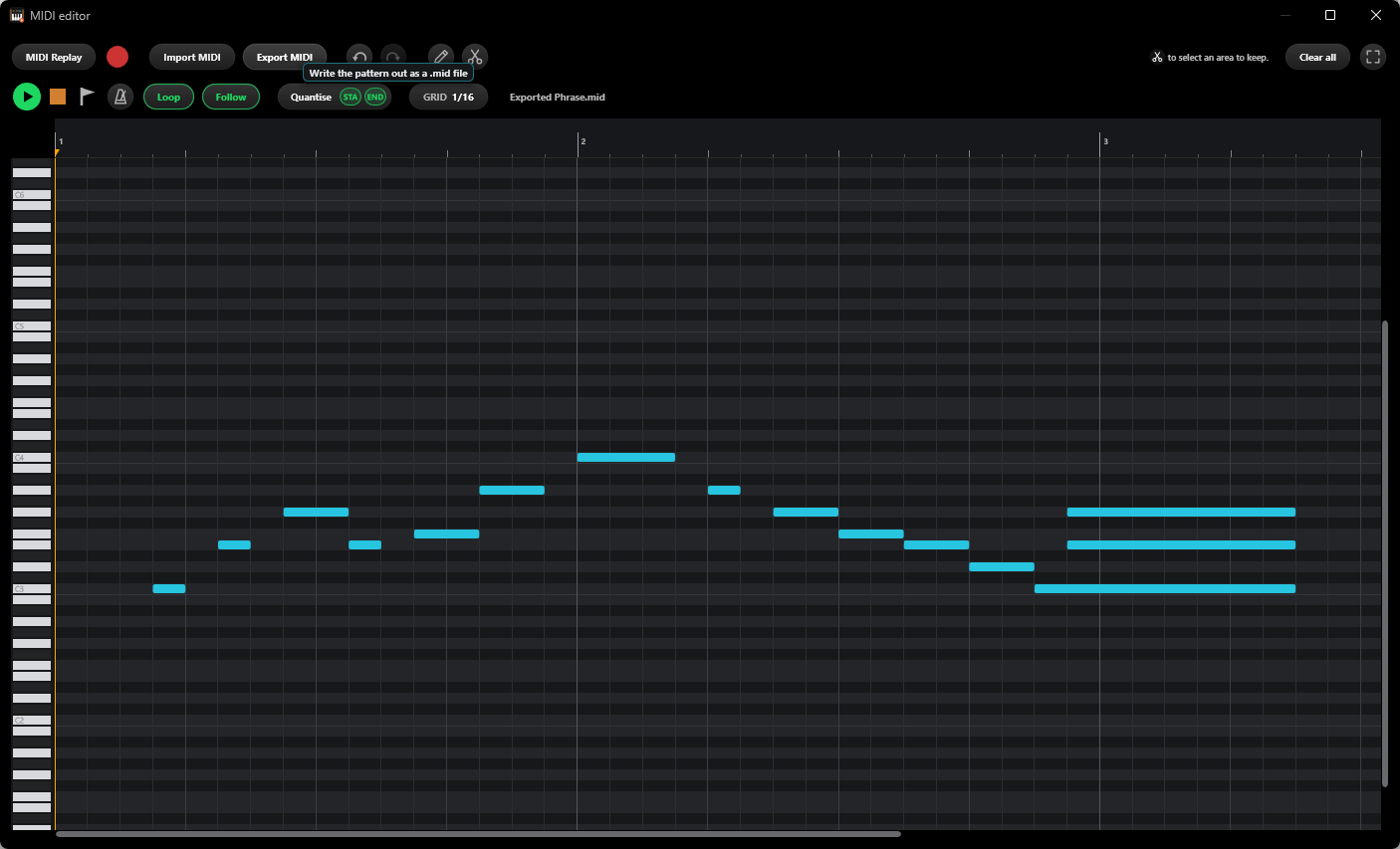
Edit and export MIDI
Quantise, copy, paste, duplicate, box select and zoom on a tempo grid, then export a standard .mid file for your DAW. It exports MIDI (the notes you played), not audio.
Use your computer keyboard as a MIDI controller
Press M and your keyboard becomes a piano: one row, or two rows for over two octaves, with Z and X or [ and ] to change octave, or keys of your own. Every real MIDI input still works at the same time, including ones plugged in while the app is running.
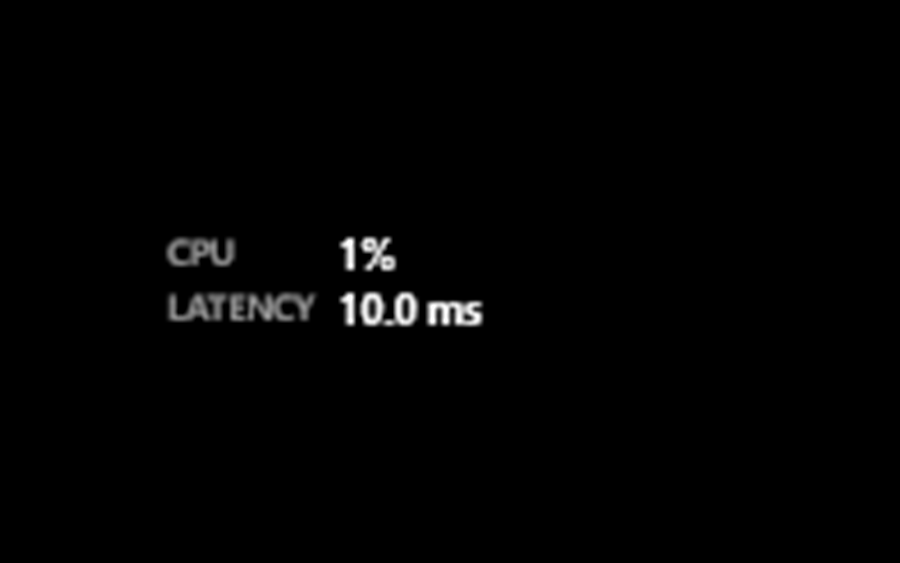
Low CPU and latency
CPU and latency sit in the toolbar while you play. WASAPI exclusive mode runs at roughly 5 to 10 ms; turn it on under the gear icon.
| Type | Standalone desktop application |
|---|---|
| Hosts | VST3 instruments installed on your system (effects are filtered out) |
| Plugin scan | Separate process · scan new only or rescan all · favourites |
| Input | All MIDI inputs, hot-plug · computer keyboard (M), one or two rows, Z/X or [ ] for octaves |
| MIDI capture | MIDI Replay, always on · Record · piano-roll editor |
| Files | Export and import standard .mid · record audio as WAV, MP3 or FLAC |
| Audio | WASAPI shared or exclusive · DirectSound |
| Remembers | Last instrument and its patch, audio device, output volume |
| Platform | Windows 10 / 11 |
| Licence | One computer at a time; move it from Settings > Release license |
| Price | Standard $10 (3 PCs $20) · Pro $20, one-time, no subscription |
432hz
Your whole computer sound, retuned
Windows & Mac
Download the App
Features
- Retunes every app at once, live: your browser, music player, games and DAW.
- Every note from 41 Hz to 4 kHz lands within 0.2 cents, and the tempo stays the same.
- Set A4 (or C4) to any pitch you like, not just 432.
- One button switches between the original and the new pitch with no gap.
- Free, for Windows and Mac.
An idea from the 432Hz trend – what if you could retune your computer’s entire audio output to your liking? YBK AUDIO’s light app 432Hz does that in a very simple and easy way.
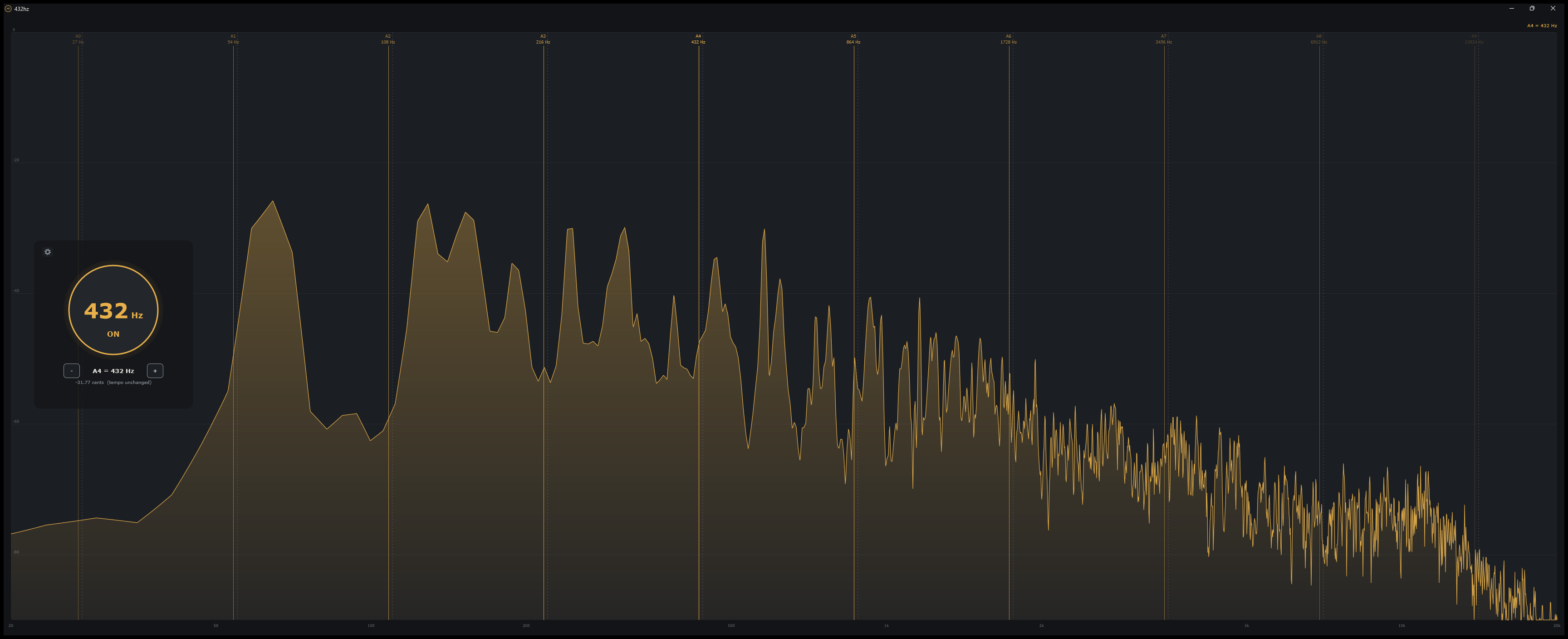
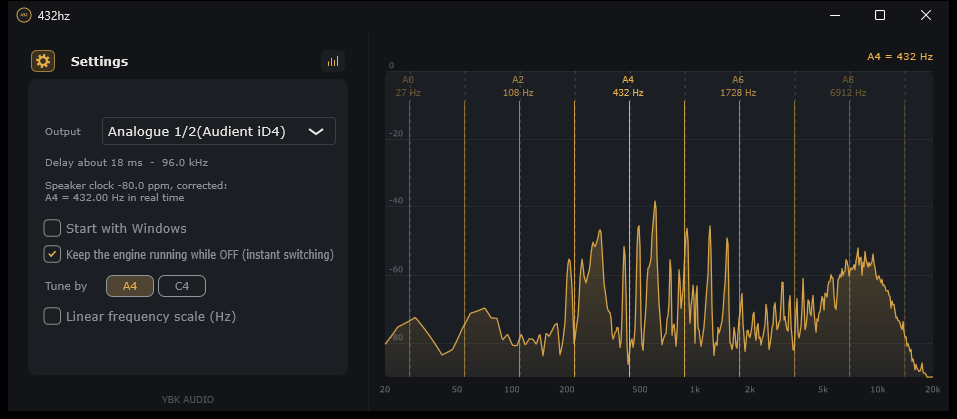
Open the spectrum graphs to see the frequency change as the numbers go down and up. This app is great both for visual analysis, teaching and everyday listening.
Who knows, maybe hearing everything in 432Hz really is good for you.
Explore each feature
Every app, at once
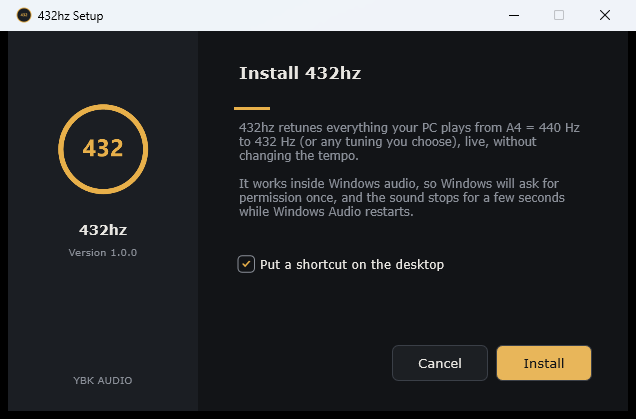
Whatever your computer plays to your speakers or headphones is retuned, from the browser and music player to games, video calls and your DAW. It works inside the system’s own audio, so there’s nothing to set up in each app.
Before and after, one click
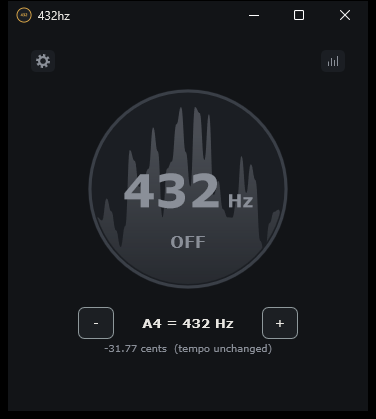
The big button switches between your new pitch and the original while the music keeps playing, with no click or gap. Left-click the gold ring by the clock to do the same from the tray.
Any pitch you want
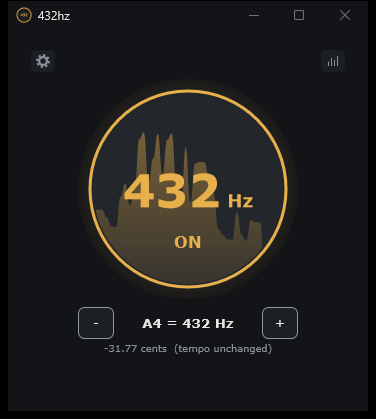
Set A4 anywhere from 1 Hz to 20,000 Hz: step with − and + (hold to repeat), or double-click the number and type it. Prefer to think in C? Tune by C4 instead.
See where your tuning sits
Open the spectrum and every A (or C) of your tuning is marked, from the lowest octave to the highest. Maximise the window and it fills the screen.
Right on pitch
Every speaker’s clock runs a little fast or slow. 432hz measures yours and corrects for it, so the pitch comes out exactly where you set it. At A4 = 432, a 440 Hz tone really becomes 432 Hz.
Out of sight
Close the window and 432hz keeps going from the tray (the menu bar on a Mac). Turn on Start with Windows (Open at login on a Mac) and every session starts at your pitch. Uninstall it and your sound is back exactly as it was.
| Type | Desktop app with a tray / menu-bar icon · changes the pitch of all system audio |
|---|---|
| Pitch | Any A4 from 1 to 20,000 Hz, or set by C4 · tempo unchanged · starts at A4 = 432 Hz (−31.77 cents) |
| Accuracy | Within two semitones of 440 (432 included): within 0.2 cents from 41 Hz to 4 kHz · bigger shifts: within about 4 cents, though far downward shifts can leave the lowest notes up to 35 cents off · speaker clock drift corrected |
| Delay | On Windows: about 10 to 20 ms within two semitones of 440, about 120 ms for bigger shifts · CPU about 1.5 to 2% |
| Works with | Windows: apps that play through Windows’ normal (shared) audio. ASIO and exclusive-mode audio bypass Windows’ audio engine and are not tuned. Mac: what macOS plays, through its system-audio tap. |
| Install | Windows: one administrator prompt for the Windows audio step · the sound drops for a few seconds while it installs · speakers added later (new USB or Bluetooth) are retuned after running the installer again. Mac: drag 432hz into Applications · allow System Audio Recording when asked |
| Uninstall | Windows: Settings > Apps, and your speakers go back to how they were. Mac: quit it from the menu bar and drag it to the Trash; it changes nothing in the system |
| Platform | Windows 10 / 11, 64-bit · macOS 14.2 (Sonoma) or later, Apple Silicon and Intel |
| Price | Free · pay what you want, if you like |
MultiConsole
A live mixing console for your PC audio
Coming soon
- One activation, on the computer you install it on
Checkout is not open yet
MultiConsole is still in development, so there’s nothing to buy yet. We left this button unconnected to a payment page on purpose.
Before this button works, three things have to happen:
- The app reaches a releasable build, code-signed with a Windows installer.
- A checkout provider is connected, so card details go to them and never to us.
- Licensing is switched on, so a purchase issues a code that runs on one computer at a time and moves with you.
Your license keeps working after
- Resetting or reinstalling Windows on the same computer
- Windows updates, driver updates and app updates
- Swapping the drive, RAM, graphics card or monitor
- Changing your audio interface, network or VPN
Move your license (Settings > Release license) when you
- Replace the motherboard or CPU
- Change to a different computer
- Run the app inside a new virtual machine
- Old computer broken? Write to us and we’ll release it
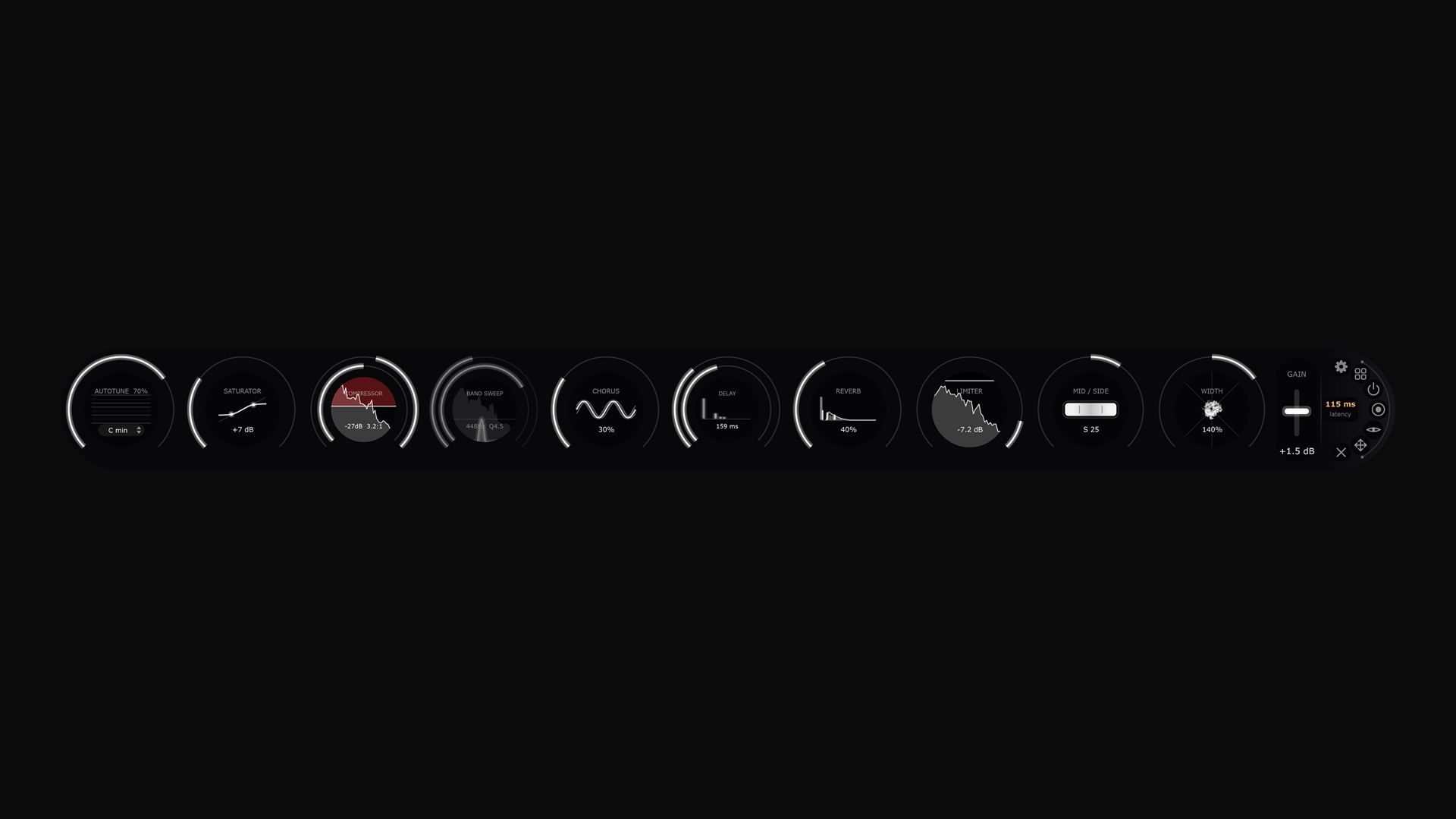
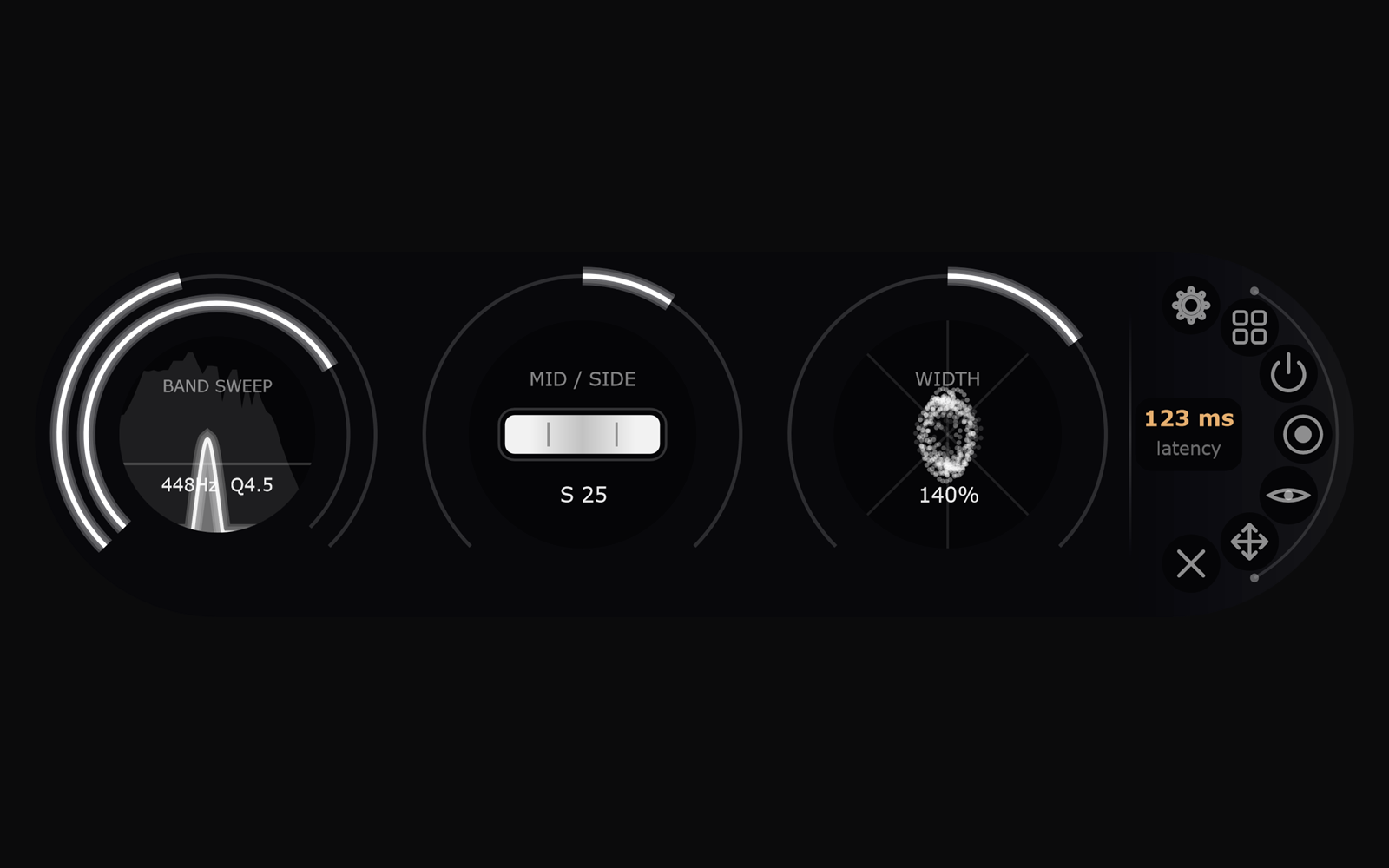
Ever imagined A Desktop FX Chain? Change the state and visibility of any knob and line them up the way you want. Mix YouTube vocals live. Mess with your favorite song. Even, analyze and hear different frequencies using our Band Sweep. MultiConsole has all audio effects you need, and it awaits your touch.
Analyze and Experiment using our 11 knobs to hear what your whole computer sound would be like with a little touch. The app provides Autotune, Saturator, Compressor, Band Sweep, Chorus, Delay, Reverb, Limiter, Mid/Side, Width and Gain that you can move around in your desktop or minimize.
Explore each feature
Every app, one place
Whatever is playing on your PC passes through the same chain, so one setting works on a song, a video and a game alike.
The details move with the knob
Turn up a compressor or a reverb and the ratio, make-up gain, room size and mix follow together. Every module starts neutral.
A live display in every knob
Each knob’s dark centre shows its own effect as it happens: a spectrum, a stereo image, an echo timeline or a piano roll of corrected pitch.
Keep what you hear
One button records the final output to a 24-bit stereo WAV file on your computer, without dropouts.
Out of the way, never hidden
A pill-shaped window with adjustable background transparency, horizontal or vertical, that hides to the system tray.
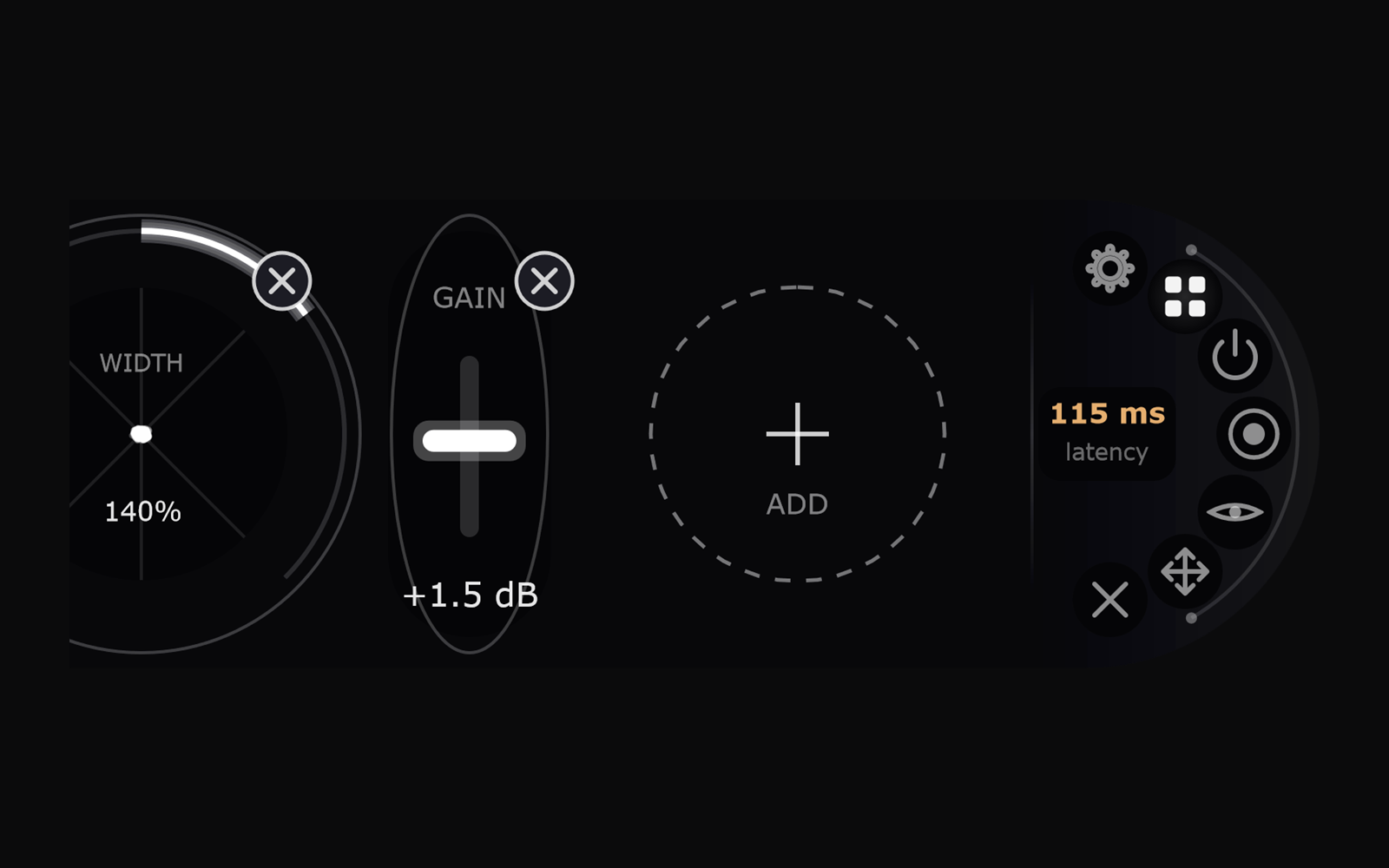
Drag, remove, add back
Reorder the effect chain by dragging knobs on the capsule itself. A switched-off knob stays visible in grey, so its setting is never lost.
Smooth bypass and changes
Bypass the whole chain with a 20 ms crossfade and come straight back. Every change ramps instead of popping.
The real delay, shown live
Driver input and output, buffer and module delay are added up and displayed on the capsule. Settings save automatically.
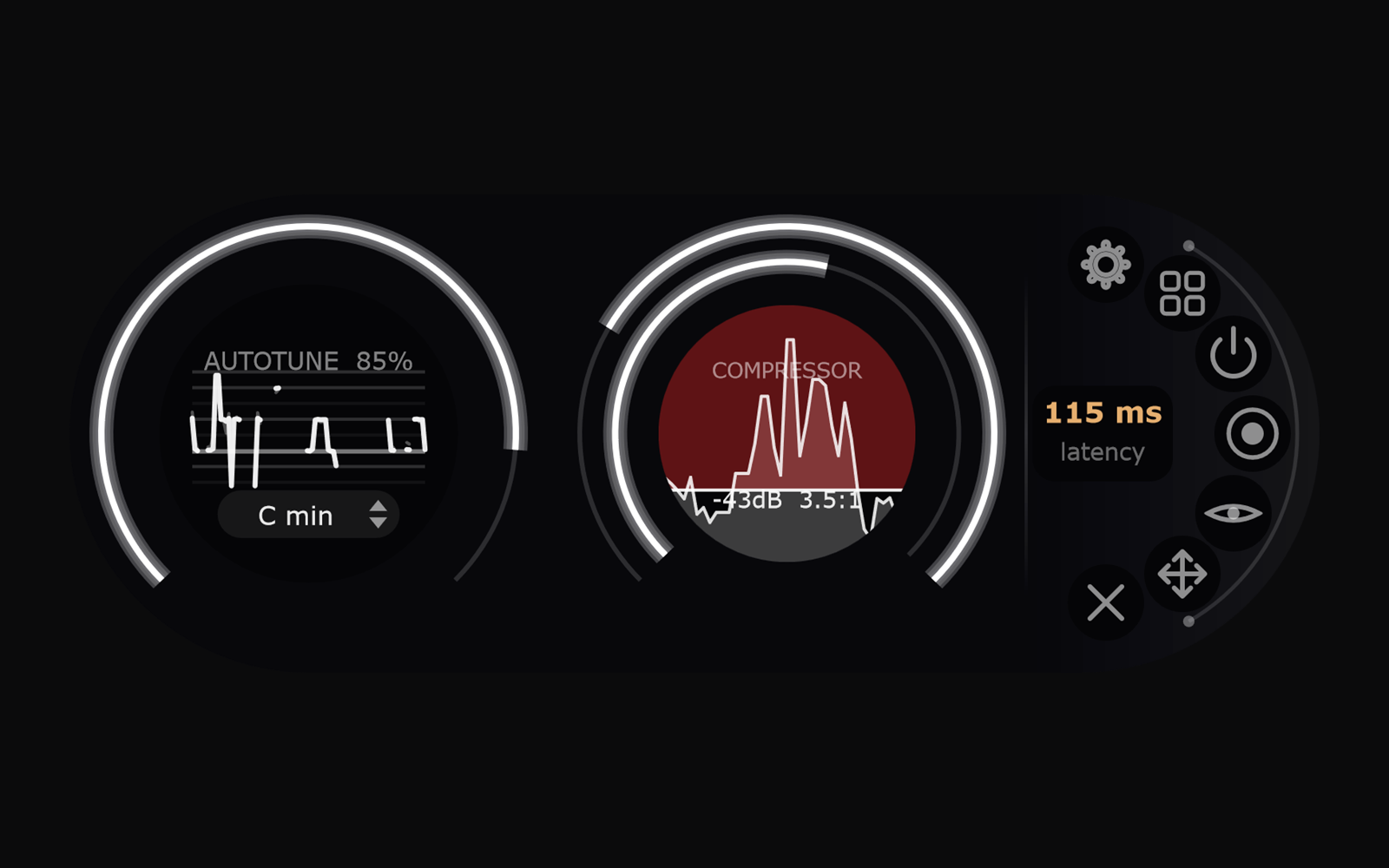
| Autotune | Hard, glide-free snap to the nearest note in your key: Chromatic or any of 24 major and minor keys. Works on vocals and on full mixes; breath and texture are left alone. About 85 ms latency while on. |
|---|---|
| Saturator | Drive 0 to +24 dB with automatic level matching, so the texture changes and the volume doesn’t. 4× oversampled. |
| Compressor | Outer ring sets threshold (0 to −60 dB); inner ring raises ratio (1:1 to 10:1) and make-up gain together. Over-threshold energy glows red on a live spectrum. |
| Band Sweep | Hear only one band. The outer ring sweeps 20 Hz to 20 kHz, the inner ring scales the width from 0.25× to 4×. 48 dB/oct slopes on both sides, with automatic loudness make-up. |
| Chorus | One knob raises depth, speed and mix together. |
| Delay | Stereo echo. Outer ring sets echo level and repeats; inner ring sets the gap, 20 ms to 2 s. The centre flashes an echo timeline in time with the music. |
| Reverb | One knob grows the room size and the reverb level together. |
| Limiter | Brick-wall limiter. Turning up lowers the ceiling from 0 to −60 dB; it only reduces, never adds level back. |
| Mid/Side | −100 is mid only, 0 is untouched, +100 is side only. |
| Width | 0% mono, 100% untouched, 200% twice as wide, shown as a live stereo-image cloud. |
| Gain | −24 to +24 dB output fader. |
| Type | Standalone desktop application (not a plugin) |
|---|---|
| Processes | All system audio, in real time |
| Modules | 11, reorderable, each with its own on/off |
| Recording | 24-bit stereo WAV of the final output |
| Latency | Shown live; depends on your driver and which modules are on |
| Presets | Save and load; current state saves automatically |
| Requires | Free VB-Audio Virtual Cable, or an interface with loop-back |
| Platform | Windows 10 / 11 |
| Licence | One computer at a time; move it to a new one from Settings once every 30 days |
Visualize
Stereo imaging, in 3D.
Windows & Mac
Get Visualize / Try it out
Features
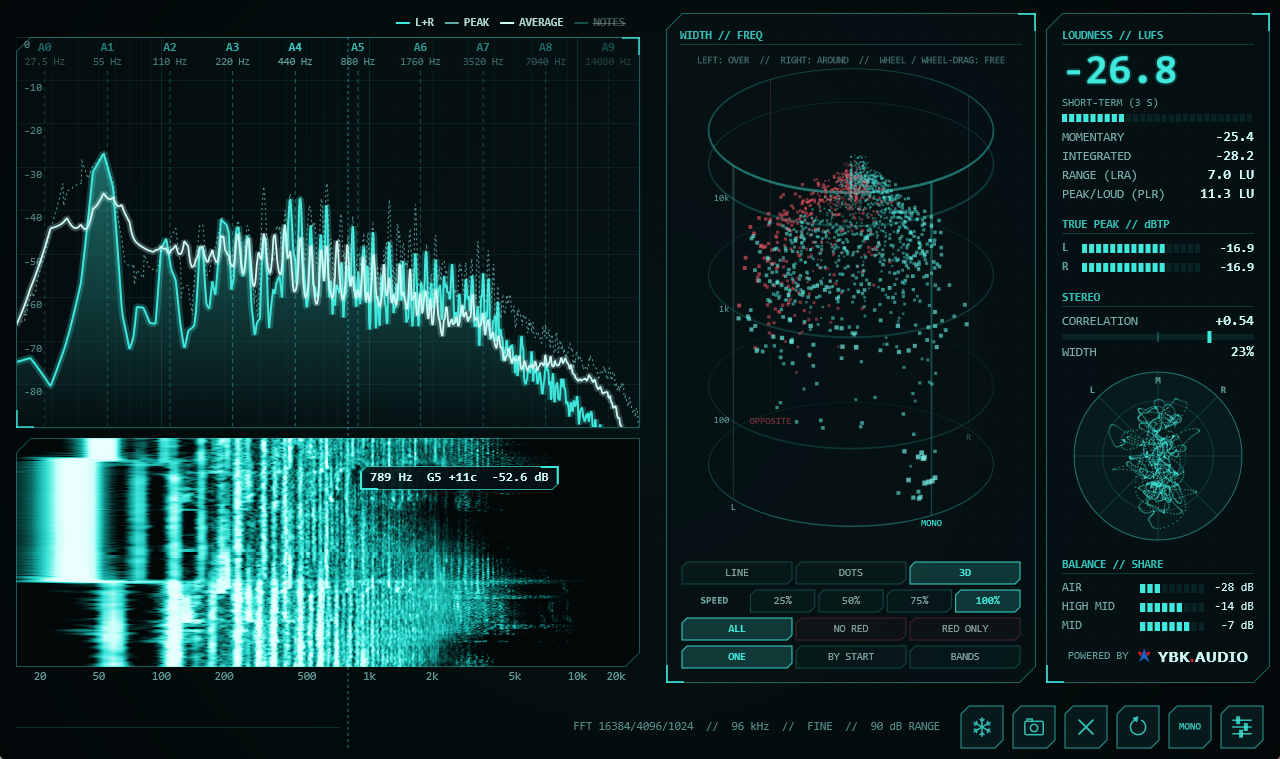
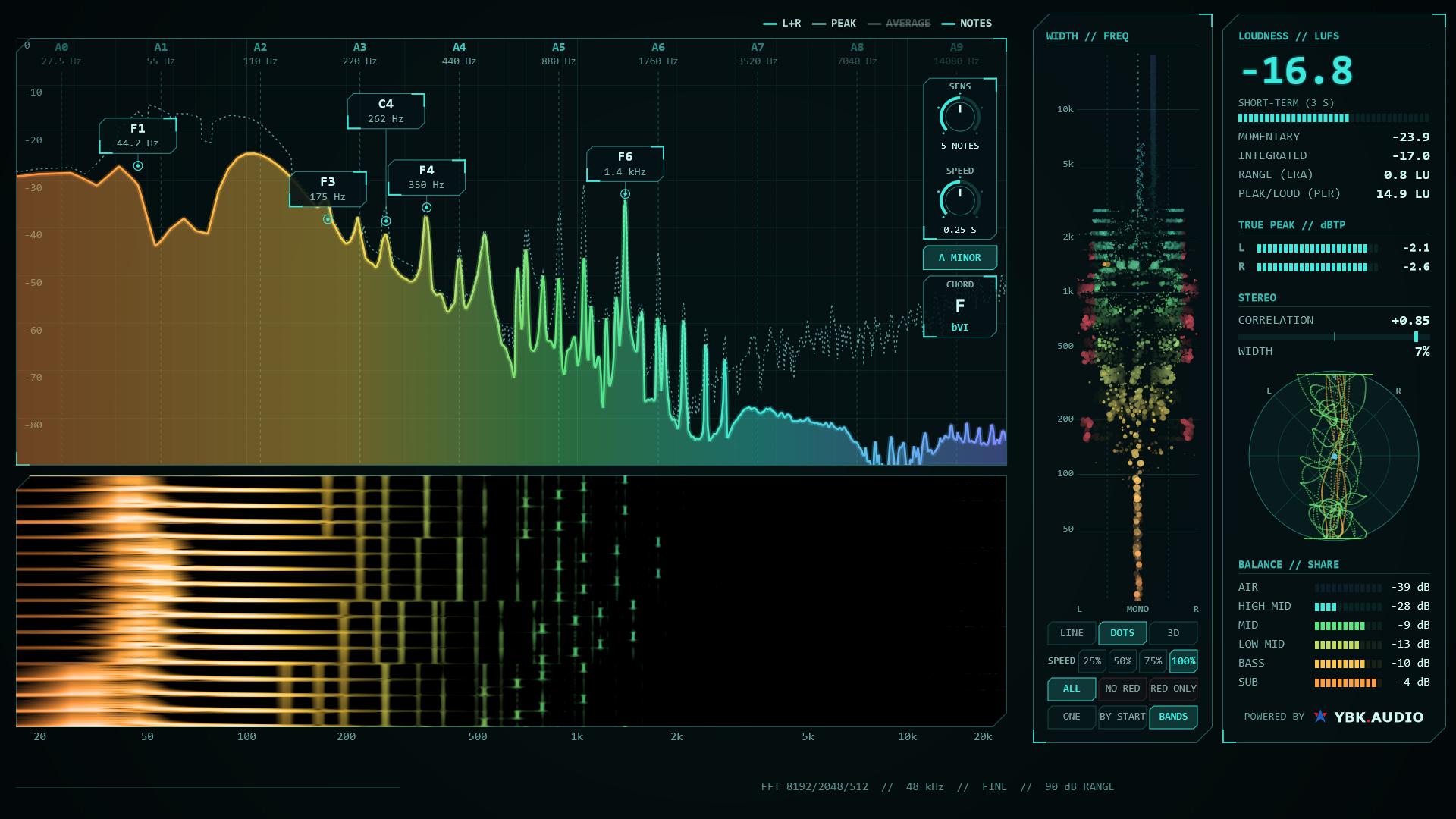
- A 3D cylinder shows how wide every frequency is and where it cancels in mono.
- Note names on the peaks, plus an estimate of the key and the chord playing now.
- LUFS, loudness range and true peak, measured the EBU R128 way.
- Nothing to set up. It listens to whatever your computer plays.
- 7-day free trial on Windows and Mac.
Not sure? Download and try our 7-day free trial
By purchasing you agree to the Terms.
The payment window didn’t open
Our payment provider’s checkout couldn’t load. This is usually an ad or tracker blocker, or a connection that dropped for a moment. Reload the page and press Purchase again.
Your license keeps working after
- Resetting or reinstalling the operating system on the same computer
- System updates, driver updates and app updates
- Swapping the drive, RAM, graphics card or monitor
- Changing your audio interface, network or VPN
Move your license (Release license in the app) when you
- Replace the motherboard or CPU
- Change to a different computer
- Run the app inside a new virtual machine
- Old computer broken? Write to us and we’ll release it
The idea came from a mixing course – what if we could Visualize the locations of each sound in a mix? The pad at the back, the bass and kicks at the bottom, mono and stereo instruments kicking in right and left, the vocals. We were working on that idea when we came up with an idea to extend a stereometer by frequency.
You can find stereo imaging anywhere. But not in 3D.
Visualize proposes a new way of stereo image analysis. From a cylinder-shaped Vectorscope stacked up every frequency, to a monitoring environment that measures Mono loss, we provide groundbreaking 3D graphs you can use to analyze a song’s phasing.
Explore each feature
A vectorscope for every frequency
One vectorscope per frequency, stacked up into a cylinder from bass to highs. The front is mono, the sides are left and right only, the back is sound that cancels in mono. Drag to turn it.
Your two speakers in a room
See where each sound appears between your speakers, and what the speakers fill the room with.
Every sound where it sits in the mix
Each sound is a cloud at its place in the mix: left and right is its pan, height is its pitch, the front is loud, and a wide cloud means its left and right are unalike.
See the instruments apart
Switch the colours to STEMS and an AI colours every graph by instrument: vocals yellow, drums blue, bass violet, everything else green. It runs about a second behind the music.
Check what mono will lose
Every frequency, measured: left and right is its level balance, height is its pitch, the back is what gets lost when the mix is summed to mono. Inside the faint target shape is mono-safe; dots outside it stand out.
Know what’s playing
The loudest peaks are labelled with their note, like “F1 · 44 Hz”. One click listens for about 8 seconds and estimates the song’s key; a chord box then shows the chord playing now.
| Type | Full-screen desktop app · listens to everything your computer plays |
|---|---|
| Shows | Spectrum and waterfall · note labels · key and chord (estimates) · peak, average and snapshot curves |
| Loudness | Momentary, short-term and integrated LUFS · LRA · PLR · true peak in dBTP · measured the EBU R128 / ITU-R BS.1770 way |
| Stereo | Width per frequency (line, dots, 3D) · goniometer · polar · width per band · correlation · balance per range |
| Listen tools | Optional: mono, cancelling parts only, or everything but them · need VB-CABLE, a free separate download not made by us |
| Platform | Windows 10 / 11, 64-bit · Mac: macOS 14.2 or later |
| Price | $19 launch price until Nov 6, 2026, then $29 · one-time · 7-day free trial |
MixAlign
Compare every version of your song, aligned to the sample.
Windows & Mac
Download the App
Coming soon
- Works with the Windows and the Mac version
- Runs on one computer at a time, and moves with you when you change computers
The payment window didn’t open
Our payment provider’s checkout couldn’t load. This is usually an ad or tracker blocker, or a connection that dropped for a moment. Reload the page and press Purchase again.
Your license keeps working after
- Resetting or reinstalling the operating system on the same computer
- System updates, driver updates and app updates
- Swapping the drive, RAM, graphics card or monitor
- Changing your audio interface, network or VPN
Move your license (Release license in the app) when you
- Replace the motherboard or CPU
- Change to a different computer
- Run the app inside a new virtual machine
- Old computer broken? Write to us and we’ll release it
Switch instantaneously between different versions to hear differences. One click and you will be hearing another version of your mix with no delay – all easily possible because we auto-align your uploaded mixes with beat detection. Also you can check the analysis panel, which provides written description on differences between versions. The app provides difference/null buttons to hear just the differences, so you can check and compare yourself.
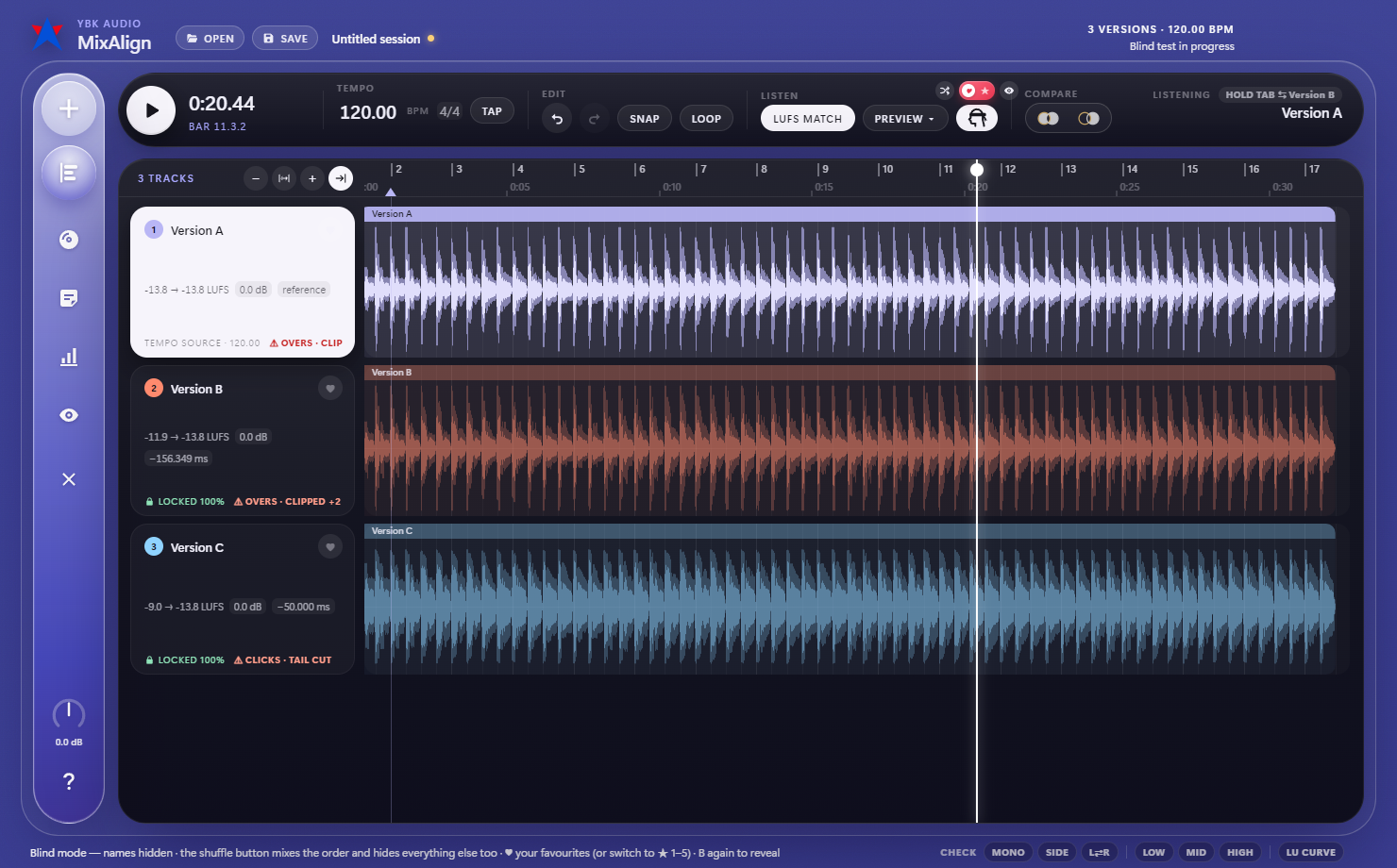
Blind test & Annotate. Hide track names and test your decision on what’s better. Rate each track you go through with stars to come back to them. When you’re sure on what you think is best, make the big reveal to find out which track to share. Also while sharing, you can leave your thoughts on the timeline of each track and export them as PDF for whoever to see.
Explore each feature
Lined up to the sample
Every version snaps to the first one, sample-exact, however much silence it starts with. Edits that cut or move a section are placed part by part, and the first file sets the tempo grid.
Hear exactly what changed
NULL plays everything that differs between two versions, so silence means they are identical. DIFF plays only what the selected version added. Hold Δ HEAR to listen for a moment and let go to come back.
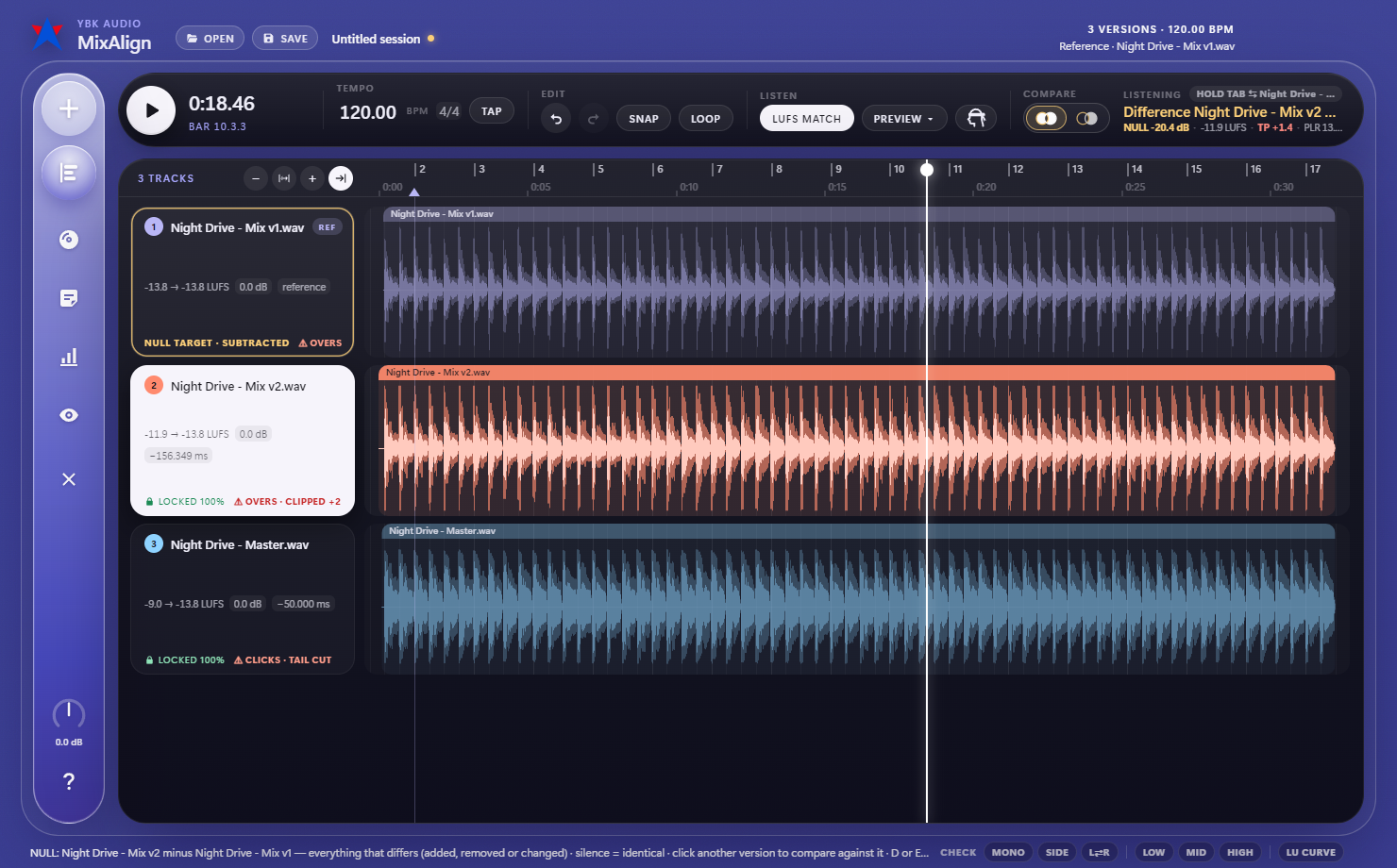
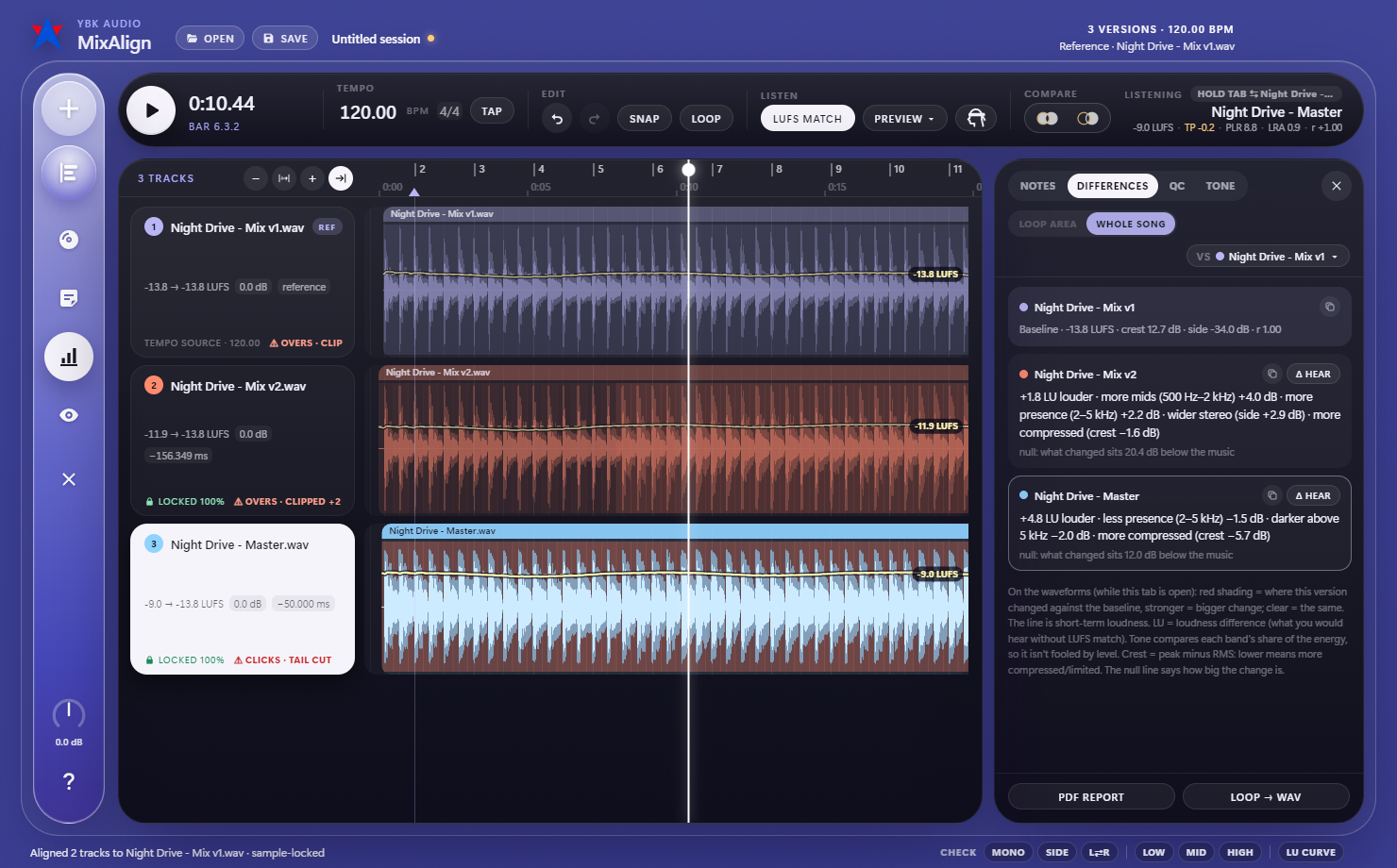
What changed, in plain words
For every version against your baseline: louder or quieter, brighter or darker, wider or narrower, more or less compressed, over the whole song or just the loop.
Choose with your ears
Hide the names, shuffle the order, and pick a favourite or rate 1 to 5 stars. Press reveal to see which version you really preferred.
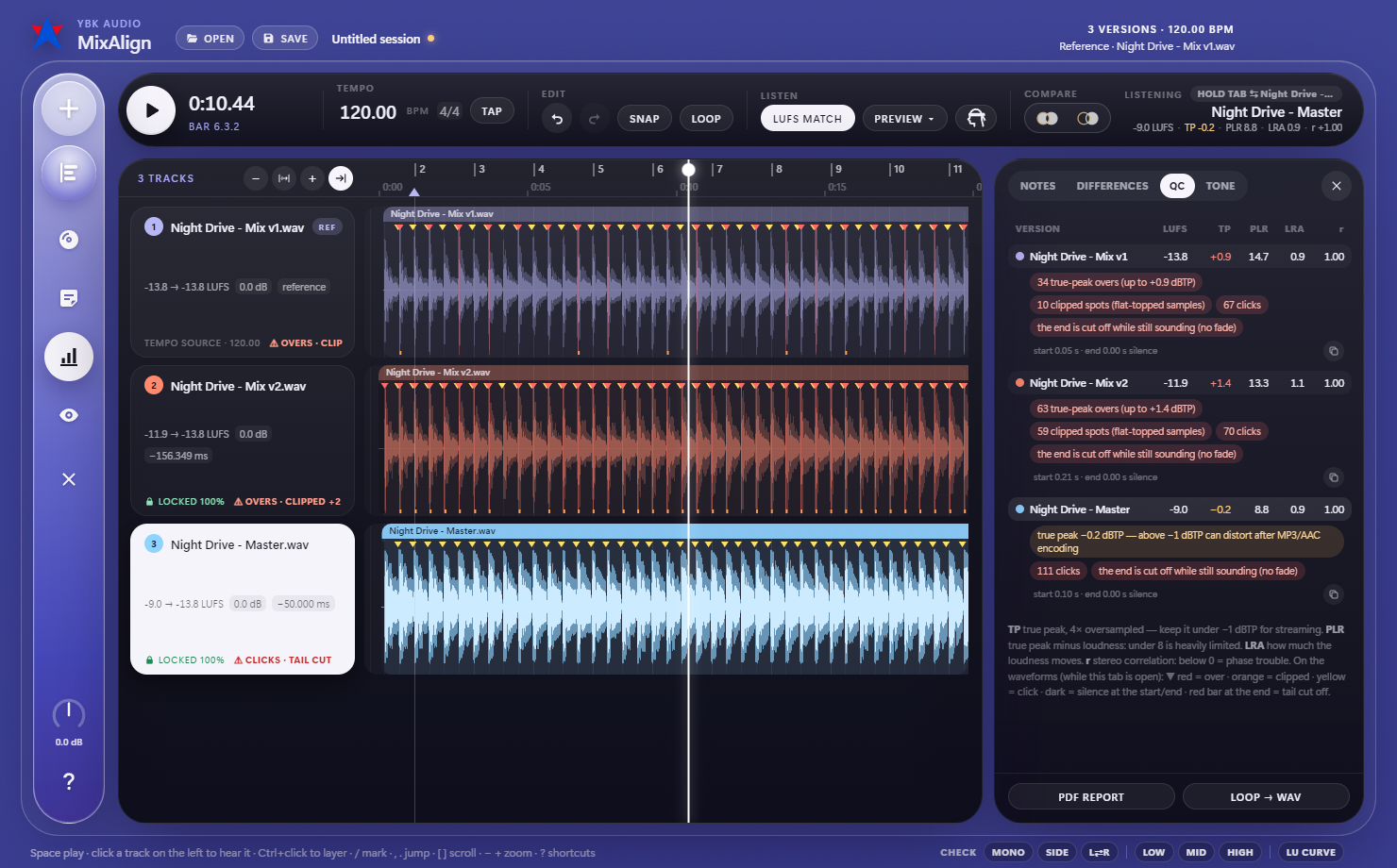
Catch problems before they ship
True peak, clipping, clicks, silence at the start, a cut-off tail and DC offset, marked where they happen. Streaming preview plays each master the way Spotify, Apple Music and YouTube will turn it down.
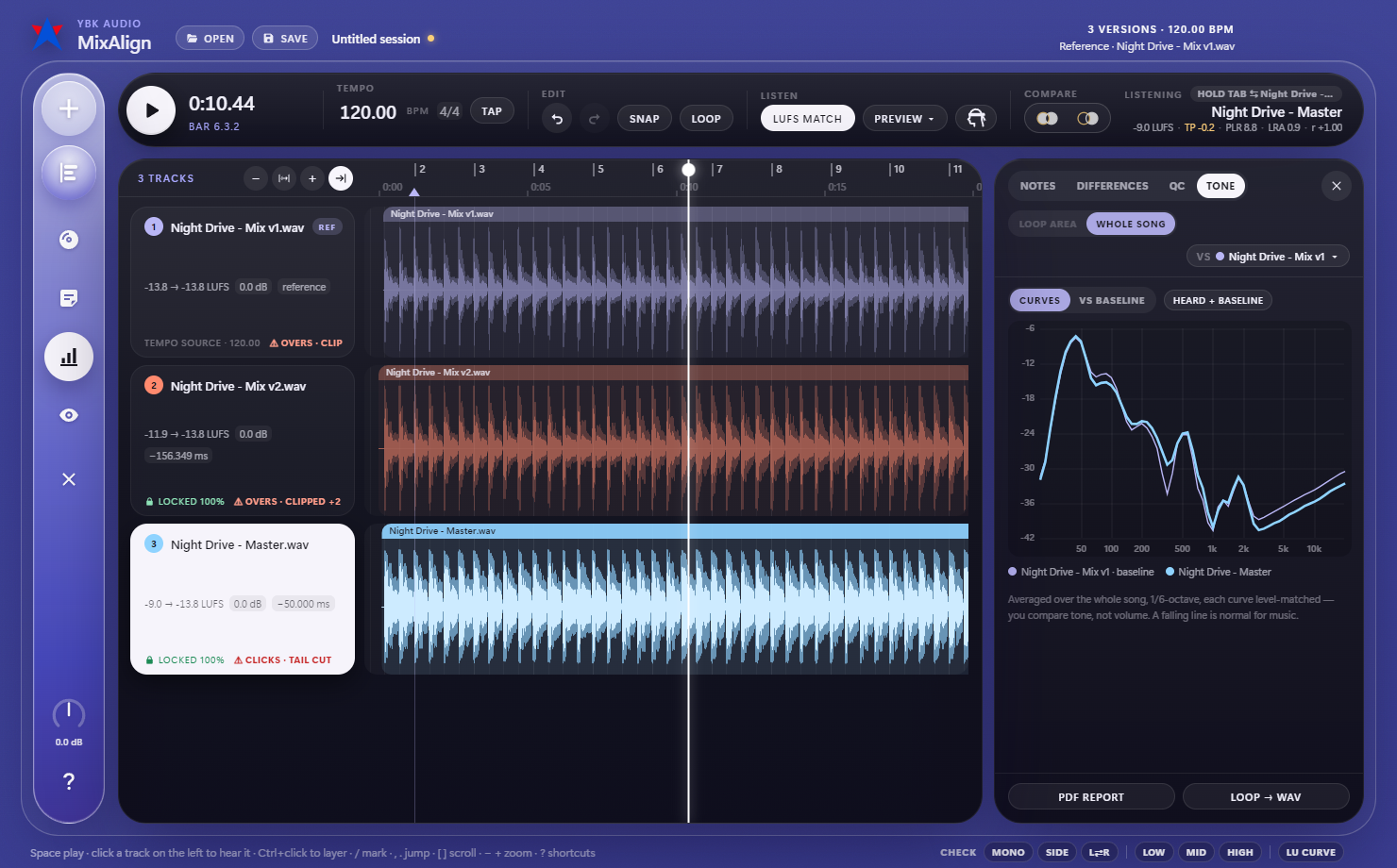
Tonal balance side by side
An averaged frequency curve per version, or each one against the baseline, so you can see where a new mix got brighter, thinner or heavier. Add a released song as a reference, loudness-matched.
| Type | Desktop app for comparing versions of one song |
|---|---|
| Files | WAV, AIFF, FLAC, MP3, M4A, OGG and more · as many versions as you like |
| Alignment | Sample-exact · different start times and edited sections · tempo grid from the first file |
| Listening | Gapless switching · LUFS match · NULL and DIFF · mono, side and low / mid / high checks · streaming preview |
| Analysis | Differences in plain words · loudness curve · tonal balance · mastering QC · PDF report · loop export to WAV |
| Sessions | Saves the files, alignment, names, colours, notes, marks and loops |
| Platform | Windows 10 / 11, 64-bit · Mac, Apple Silicon and Intel |
| Licence | One computer at a time; move it to a new one from About › Release license |
Beatmaker
The easiest DAW for beatmaking
Coming soon
- One activation, on the computer you install it on
Checkout is not open yet
Beatmaker is still in development, so there’s nothing to buy yet. We left this button unconnected to a payment page on purpose.
Before this button works, three things have to happen:
- The app reaches a releasable build, code-signed for Windows.
- A checkout provider is connected, so card details go to them and never to us.
- Licensing is switched on, so a purchase issues a code that runs on one computer at a time and moves with you.
Your license keeps working after
- Resetting or reinstalling Windows on the same computer
- Windows updates, driver updates and app updates
- Swapping the drive, RAM, graphics card or monitor
- Changing your audio interface, MIDI keyboard or network
Move your license (Settings > Release license) when you
- Replace the motherboard or CPU
- Change to a different computer
- Run the app inside a new virtual machine
- Old computer broken? Write to us and we’ll release it
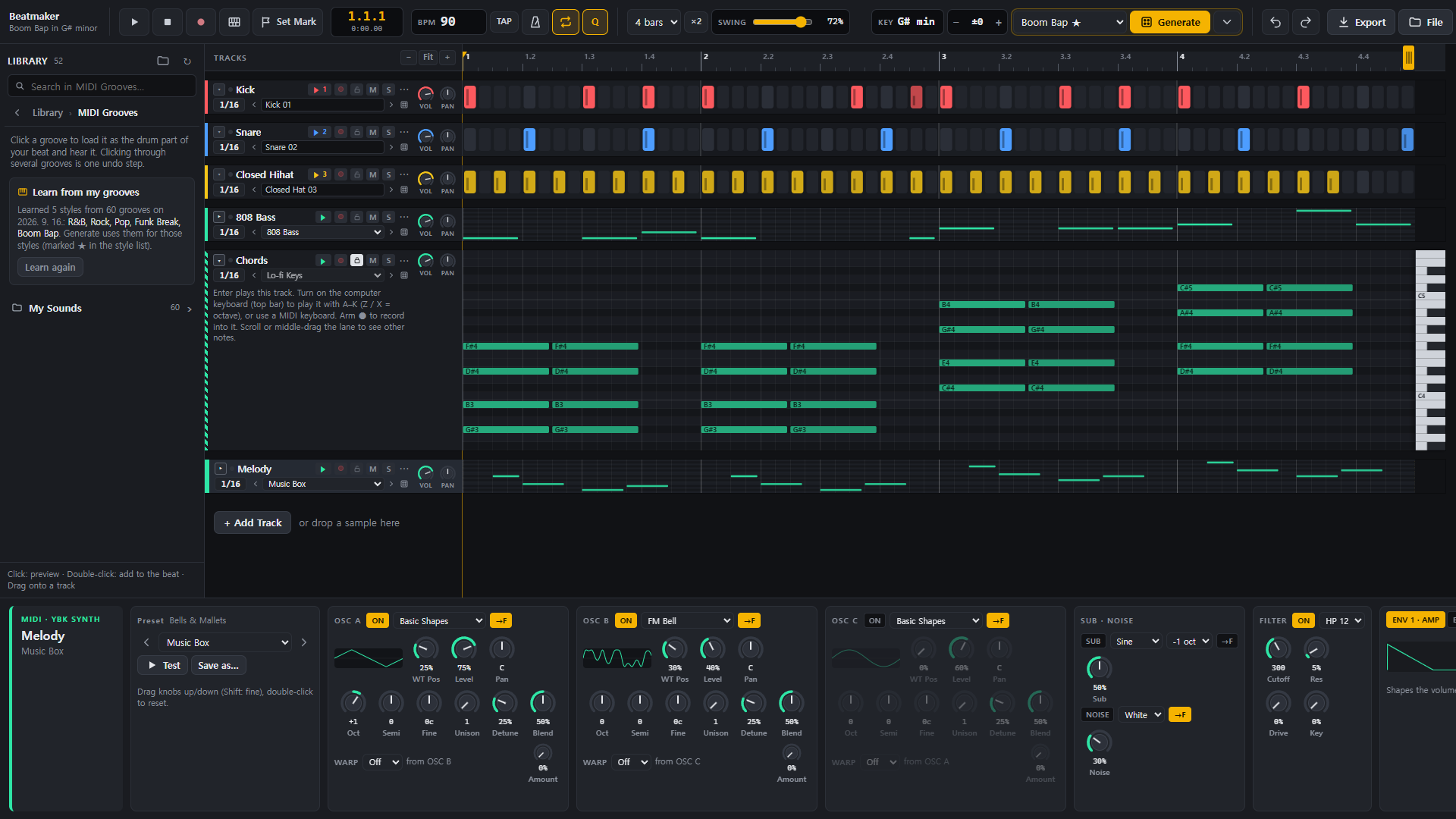
Simplistic beat programming – a DAW made just for the casual beat programmer. We minimized the hassle of setting up tracks, routing and menus before you hear a single beat, and made a DAW that is incredibly easy to use.
Need some ideas? Auto-generate drum patterns according to the BPM and genre you choose. Learned from 5000+ grooves, the Generate button can be the perfect songstarter, even for professionals.
Got no samples? Don’t worry. With the download comes 4,000+ drum samples and our own synthesizer presets that you can grab after the first download.
Explore each feature
29 genres, one click
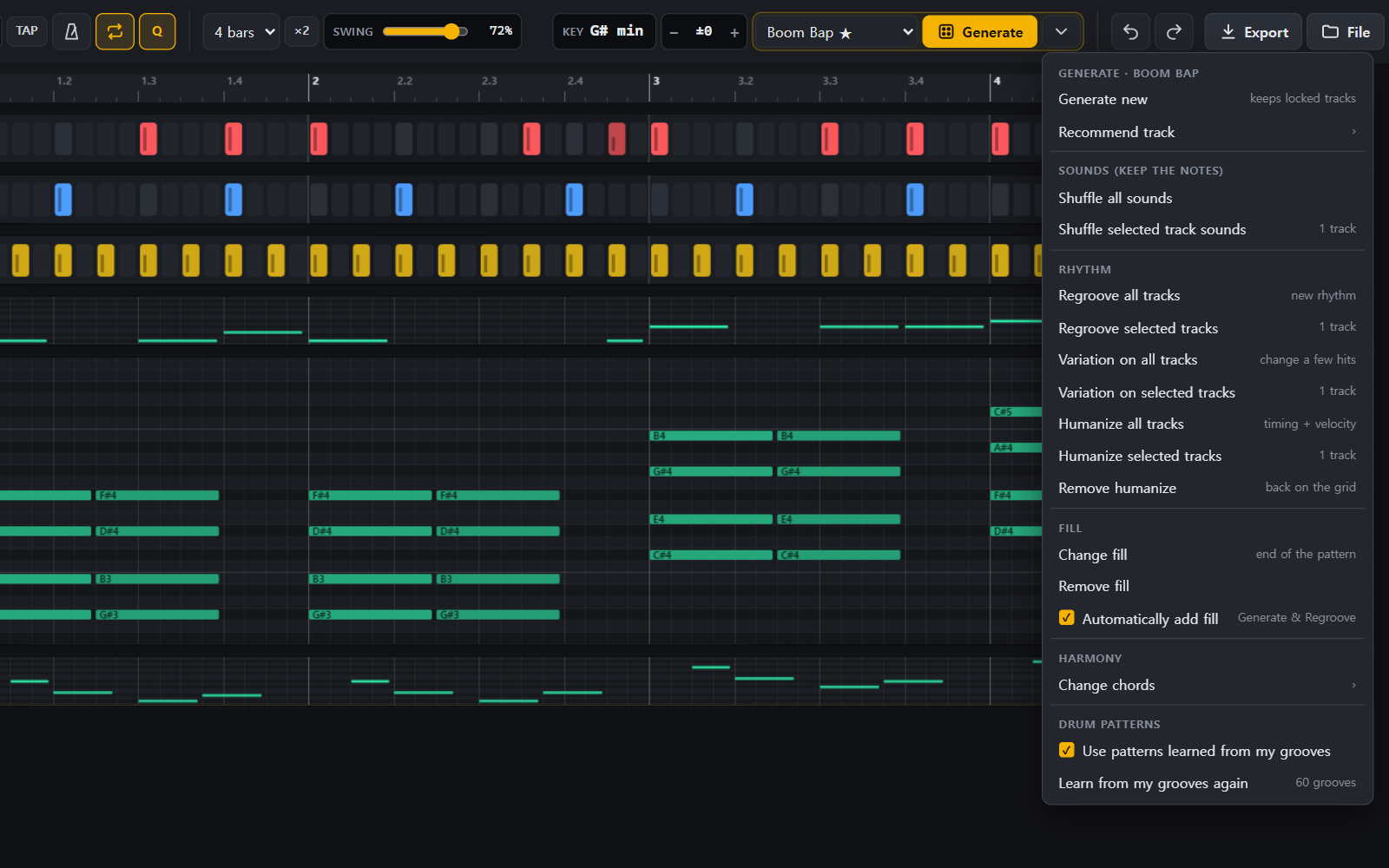
Genres run from boom bap to amapiano, and each has its own drum patterns, scales, named chord progressions, bass styles and fills.
The menu stays open
New beat, shuffle sounds, regroove, variation, humanize, fills and change chords: press them one after another until it’s right.
Every kick, found
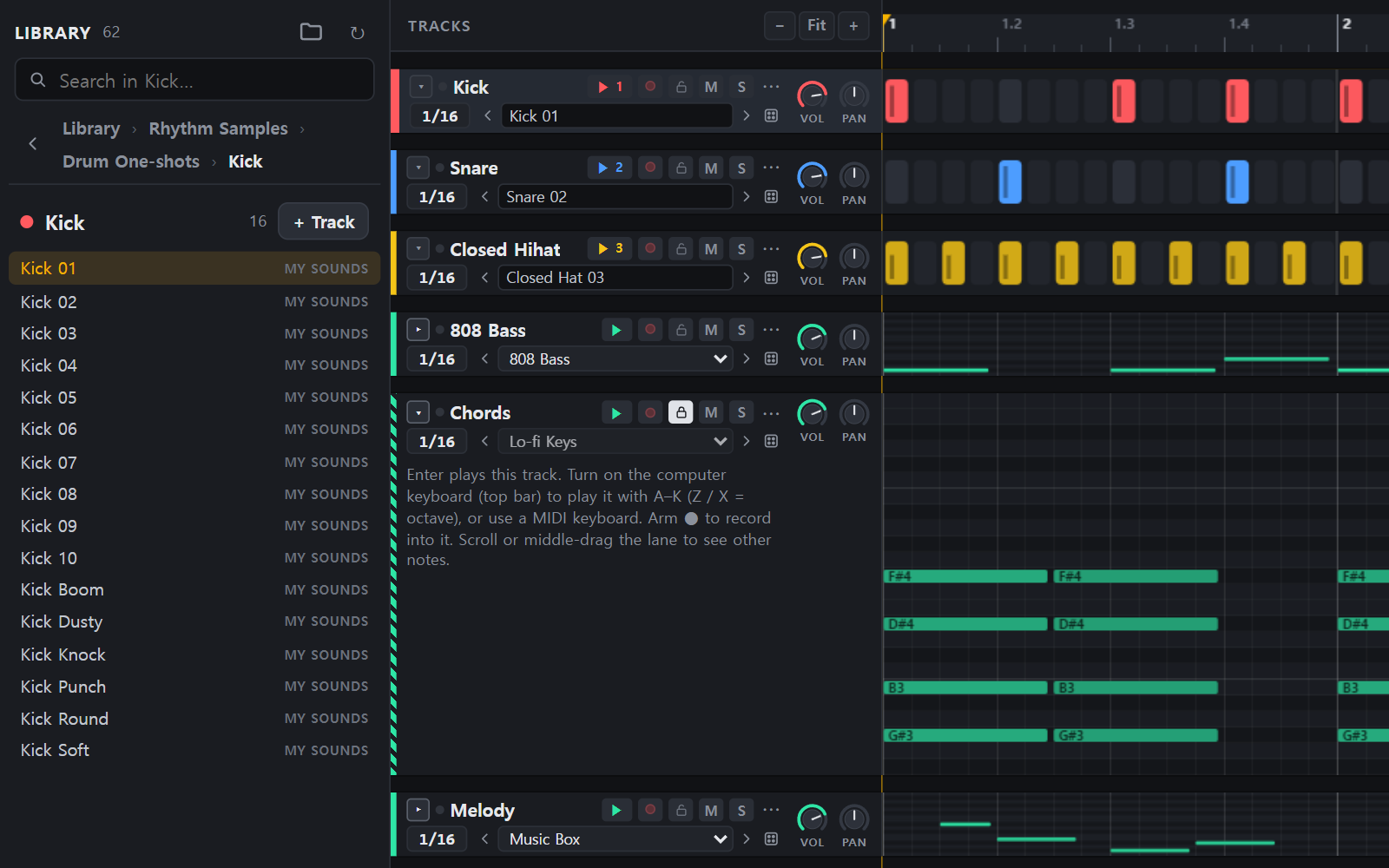
Finds the sample folders on your drives and sorts one-shots into drum types and sound families. Your files are never moved or changed.
Patterns from your MIDI library
Studies the drum grooves you own for shared patterns, accents, swing and pocket, then uses them when it generates. The result stays on your PC.
Keep what already works
Locked tracks are skipped by every generate tool, while mute, solo, volume and pan still work.
Key, scale and chords
Detects the key, keeps bass and melody in scale, and moves every track to a new key with a single drag.
78 presets to start from
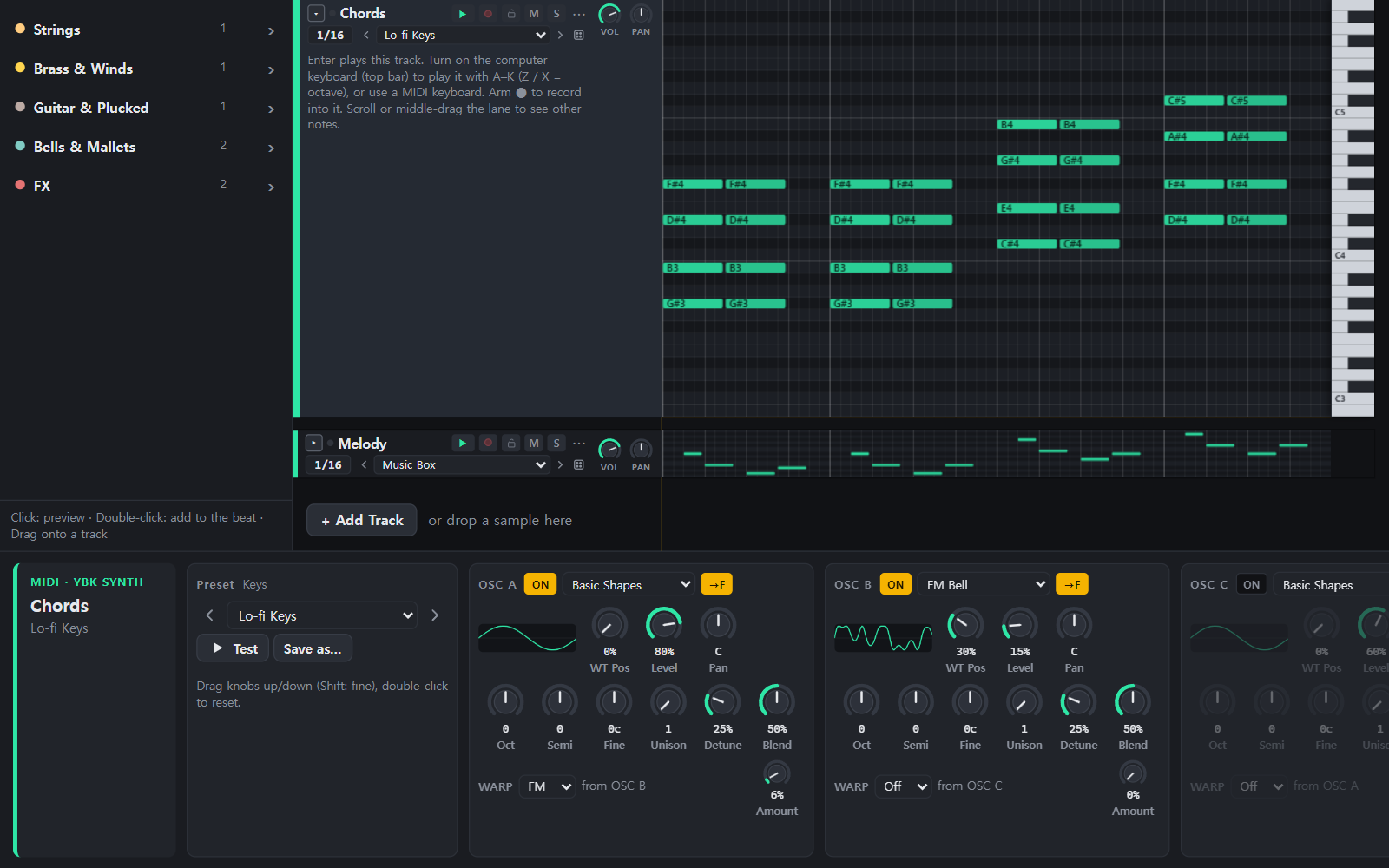
Three wavetable oscillators, filters, envelopes, LFOs and 808-style glide, for bass, keys, leads, pads, plucks and more.
Audio, stems, MIDI, project
WAV, AIFF, FLAC or MP3, as one mix or one file per track. Project files carry their samples to another PC.
| Hip hop | Boom Bap · Trap · Drill · Lo-fi · Phonk · Jersey Club |
|---|---|
| R&B & pop | R&B · Pop · K-Pop · Synthwave · Future Bass |
| Band | Rock · Punk · Metal · Funk Break · Jazz · Blues & Country |
| Dance | House · Techno · UK Garage · Drum & Bass · Dubstep · Disco |
| Latin, Caribbean & African | Reggaeton · Dancehall · Reggae · Afrobeats · Amapiano · Baile Funk |
| Type | Standalone desktop application |
|---|---|
| Tracks | Rhythm · MIDI synth · Sampler · Audio |
| Generates | Drums, bass, chords, melody and fills |
| Patterns | 4/4, 1 to 8 bars |
| Export | WAV · AIFF · FLAC · MP3 · MIDI · stems · project file |
| Play in | Computer keyboard or MIDI keyboard |
| Requires | Microsoft Edge or Google Chrome · ffmpeg for MP3 |
| Samples included | YBK Drums: 4,208 drum one-shots, made by YBK AUDIO |
| Platform | Windows 10 / 11 |
| Licence | One computer at a time; move it to a new one from Settings once every 30 days |
FAQs
Installing, your license code, and how to reach us.
Seeing “Windows protected your PC”?
When you open the Instrument Player installer, Windows may show a blue box that says “Windows protected your PC” and “Unknown publisher”. That is Windows SmartScreen. It appears for new apps that aren’t signed with a code-signing certificate yet and haven’t built up a history with Microsoft. Instrument Player is new, and our certificate is still being issued, so for now Windows can’t tell who made it.
To install it anyway, click “More info”, then “Run anyway”. Only do this with the installer you downloaded from ybkaudio.com or from the link in our email.
This has nothing to do with your license. Your code only counts when you type it into the app. Seeing this warning, closing it, or downloading the installer again never uses up a license, so there is no need to ask for a new code.
Lost your license code?
Search your inbox for an email from license@ybkaudio.com. It has your code and the download link.
Got it free during the launch month? Enter the same email on the Instrument Player page again and we’ll send the same code again.
Bought it? Email us from the address you paid with and include the order number from your Paddle receipt.
Windows says “This app can’t run on your PC”? That almost always means the download was cut short. Compare the file with the size shown under the Download button; if it is smaller, download it again. Antivirus software and unstable Wi-Fi are the usual causes.
How licenses work
- One-time purchase. You pay once. There is no subscription.
- One computer at a time. A code runs on one computer at a time. It can go onto another computer once it has been released from the first.
- Moving to a new computer. On the old computer, open Settings in the app and press Release license. Then enter your code on the new computer. If the old computer has broken down or is gone, write to us and we’ll release the license for you. A license can be moved once every 30 days.
- What doesn’t need a move. Reinstalling Windows on the same computer, app updates, and swapping the drive, memory or graphics card. A new motherboard or CPU counts as a new computer: move the license to it as above.
- Your projects and settings come too. Instrument Player keeps everything you make and set up in one folder: Documents\YBK AUDIO\Instrument Player. Copy that folder to the new computer before you start the app there, and everything will be where you left it.
- Free launch licenses. They move like any other license, and on any computer they run the versions released during the free month, up to 19 October 2026. Download the last of them →
Contact
Questions, problems or feedback: write to us and we’ll reply within 3 business days. For anything about a purchase, include your order number.
More questions
Is it a subscription?
No. You pay once and keep the app. There is no subscription.
Which computers do the apps run on?
Windows 10 and 11 (64-bit). Mac versions are in beta; each app’s download box lists the macOS version it needs.
Can I try an app before I buy it?
Visualize comes with a 7-day free trial: download it and open it, and the trial starts on its own, no code needed. To keep using it after that, buy a license and paste the code from our email into the app.
Can I use my license on two computers?
A code runs on one computer at a time. To switch, release the license in the app on the old computer and enter the code on the new one. A license can be moved once every 30 days.
Who handles the payment?
Paddle.com, our Merchant of Record. They take the payment and handle tax and invoicing, and YBK Audio never sees your card details. Your license code arrives by email right after payment.
Can I get a refund?
You can ask for a refund within 30 days of your purchase. Email ybkaudio@gmail.com from the address you bought with and include the order number from your Paddle receipt. The details are in our Refund Policy.
My Mac says it can’t verify the app. What do I do?
The Mac versions are in beta and not signed by Apple yet. The first time you open the app, go to System Settings > Privacy & Security and click Open Anyway. For 432hz and Visualize, also allow System Audio Recording when macOS asks.
Is 432hz really free?
Yes. 432hz is a free download with no email, license code or activation. You can name a price if you’d like to support it; the app is the same either way.
What does 432hz retune?
Whatever your computer plays through its normal audio: your browser, music player, games, video calls and your DAW. On Windows, apps that use ASIO or exclusive-mode audio skip the Windows audio engine, so they aren’t retuned.
Where can I download an app again?
On that app’s page here on ybkaudio.com. The code and the app are separate, so you can always download the app again and enter the same code.
How does the launch list work?
Leave your email on the home page or on an app that isn’t out yet. We send one email per app when it comes out, and nothing else.
About us
Music-making work leaves a lot of room to wonder. We wondered if we could make easier, better software for all levels of users.
- Platform
- Windows 10 & 11, and macOS.
- Licensing
- Each purchase comes with one code. It works on one computer at a time, and you can move it to a new one once every 30 days.
- Status
- Instrument Player, 432hz and Visualize are out now. MixAlign, Beatmaker and MultiConsole are in active development.
Terms & Conditions
1. Who we are
These terms govern your purchase and use of software sold on ybkaudio.com. The seller is YBK Audio, a sole proprietorship registered in the Republic of Korea and owned by Kim Yeonbum, business registration number 288-17-02789, 221 Seolleung-ro, Gangnam-gu, Seoul, Republic of Korea. You can reach us at ybkaudio@gmail.com.
By buying, installing or using Instrument Player, MultiConsole, Beatmaker or MixAlign (“the Software”), you agree to these terms.
2. Payment and our reseller, Paddle
Our order process is conducted by our online reseller Paddle.com. Paddle.com is the Merchant of Record for all our orders: it processes your payment, charges and remits any sales tax or VAT, and issues your invoice. Your purchase is also subject to the Paddle Buyer Terms. YBK Audio never receives your card details.
Prices are shown in US dollars on each product page. Paddle may show the total in your local currency and add tax where required.
3. Your license
The Software is licensed, not sold. When your payment completes, you receive one license code by email. That code grants you a personal, non-exclusive, non-transferable right to install and use the Software on one computer at a time.
- One computer at a time. The code activates the Software on one computer. To use it on another computer, you move it: release it from the first computer (in the Software’s Settings, “Release license”) and activate it on the second. The Software stops running on the first computer when the license leaves it.
- Moves. A license can be moved once every 30 days. Only the computer the license is on can release it. If that computer can no longer do so (for example because it broke down), write to us and we will release it after checking that the license is yours. We may also help with further moves when there is a good reason.
- Your computers only. Moving a license is for moving between your own computers. A license may not be shared with, lent to, or used in turn by other people.
- What doesn’t need a move. Reinstalling or resetting Windows, Windows and driver updates, app updates, and replacing the drive, RAM, graphics card, monitor or network hardware on the same computer. A new motherboard or CPU, a different computer or a new virtual machine counts as a new computer and needs a move.
- Activation. Activating needs an internet connection, and so does moving a license. See the Privacy Policy for exactly what is sent.
Free launch-month licenses (claimed free of charge between 19 September and 19 October 2026) follow the same rules, including moves, with these additions. There is one free license per person, not per email address, and it is for your own use. It may not be sold, traded or given away, and it is not a purchased license. To enforce this we compare the email addresses and IP addresses used to claim licenses (see the Privacy Policy). If one person collects several free licenses (for example under different email addresses) or offers a free license for sale, we may refuse further claims and deactivate the extra licenses. A person, not an automatic rule, makes that decision, and you can write to us if you think we got it wrong. This paragraph applies to licenses claimed from 26 September 2026.
You may use the Software for personal and commercial work. Music, recordings and MIDI files you make with it belong to you.
4. Updates
A purchased license is for the software as you bought it. New versions, updates and other editions may be free or sold separately. We may change or remove features in updates, but an update will not remove the core function of the product you bought.
A free launch-month license includes every update released up to and including 19 October 2026. Updates released after that are for purchased licenses. The free license keeps working, for good, with the last version released on or before 19 October 2026, on any computer you move it to. Later versions do not run with it; to use them, buy the Software.
5. What you may not do
- Share, sell, rent or publish your license code or the Software.
- Circumvent, disable or tamper with license activation.
- Reverse engineer, decompile or disassemble the Software, except where the law expressly allows it despite this restriction.
- Use the Software to break the law or infringe anyone else’s rights.
6. Third-party plugins and audio
Instrument Player loads VST3 instruments made by other companies. Those plugins are governed by their own licenses, which you must hold separately; we are not responsible for how they behave. MultiConsole processes audio already playing on your computer; it records only when you press Record, saving the file to your own computer, and never transmits audio. Beatmaker reads the audio and MIDI files you point it at; it never moves, changes or uploads them. MixAlign reads the audio files you open; it never changes or uploads them, and what it exports (PDF reports, WAV loops, sessions) is saved only where you choose.
7. Problems with an order
If something is wrong with your order, email ybkaudio@gmail.com with your order number and we will look into it. If a payment is reversed, the license code it paid for is deactivated.
8. Warranty
We build the Software carefully and will try to fix problems you report, but it is provided “as is”, without warranties of any kind beyond those that cannot be excluded by law. Check the system requirements on each product page before buying.
9. Limitation of liability
To the fullest extent permitted by law, YBK Audio is not liable for indirect or consequential losses (including lost data, lost work or lost profits) arising from use of the Software, and its total liability for any claim is limited to the amount you paid for the product concerned. Nothing in these terms limits liability that cannot legally be limited, such as for intentional misconduct or gross negligence.
10. Termination
Your license ends automatically if you break these terms. On termination you must stop using and uninstall the Software.
11. Governing law
These terms are governed by the laws of the Republic of Korea. If you buy as a consumer, you keep any mandatory protections given by the law of the country you live in, and nothing here removes your statutory rights.
12. Changes
We may update these terms. The version in force when you bought applies to that purchase; the date at the top of this page shows the latest revision.
Privacy Policy
Short version: we collect what it takes to sell and license the Software, to keep the free launch to one license per person, and to see whether our emails arrive and how many people use the app. Instrument Player also sends three usage numbers (app version, operating system, minutes open), which the activation window tells you about. We never sell personal data, use no advertising trackers and no cookies of our own, and never receive your audio, MIDI or files.
1. Who is responsible
YBK Audio (sole proprietor Kim Yeonbum), 221 Seolleung-ro, Gangnam-gu, Seoul, Republic of Korea, business registration number 288-17-02789. Contact: ybkaudio@gmail.com. This policy applies wherever you live; section 7 lists the rights you have, and section 8 the extra points for particular regions.
2. What we collect, when, and why
- When you buy. Paddle, our Merchant of Record, collects your name, email address, country, postal code where required, and payment details. Paddle keeps your card details; we never receive them. We receive your email address, the product, the order number, the amount paid out to us, and any later refund or chargeback, so we can deliver your license, keep sales records and handle problems.
- When you ask us to tell you when an app is out. Your email address, which app(s) you picked, the page you signed up on, the link that sent you (if any) and your country (worked out by Cloudflare). We use it only to send a confirmation and one email when that app is ready to buy; nothing else, and it is never shared. If you tick Join our newsletter, we also email you about new apps and updates now and then; every newsletter has an unsubscribe link. To be taken off the list, reply to any of our emails or write to us.
- When you download 432hz. Nothing about you: 432hz is a free download with no sign-up and no email. The download button is counted anonymously, like other clicks (see “When you visit this website”). If you choose to name a price, Paddle’s checkout asks for your email address for the receipt. If you then pay, we keep a record of the payment with that email address, as with any purchase, and send you one thank-you email; it is not added to any mailing list.
- When you claim a free launch license. Your email address; the website or link that sent you to us and its campaign tag, if any; the first page you saw; the random visit number described below; your browser language; whether you use a phone or a computer; your country and time zone (worked out by Cloudflare from the connection); and your IP address. We also record the IP address that opens the confirmation link (often your email provider’s link scanner rather than you). The email address receives the confirmation link, the code, one email about two weeks later asking how the Software works for you, and a few short reminders before the free month ends, each with an unsubscribe link. The IP addresses let us keep the free launch to one license per person: without them, one person could collect many licenses under different email addresses and sell them. If you choose to pay through “name your price”, Paddle handles that payment as described above.
- When we email you. Our email provider, Resend, tells us whether each email was delivered, delayed, bounced or marked as spam, so we notice when a license code doesn’t arrive. We do not track whether you open emails or click links in them.
- When you activate the Software. The app sends your license code, a machine fingerprint, the computer’s name and platform as Windows reports them, and the time. We also record the IP address and country of the activation. The fingerprint is a one-way code derived from your motherboard and CPU identifiers; it cannot be turned back into them and exists only so a license runs on one computer at a time. The computer name is whatever you or the manufacturer called your PC, which sometimes includes a person’s name; we use it only to answer support questions about that activation. When you release or move a license, we record when that happened, and the name of the computer it left, so that the once-every-30-days limit can be applied.
- Every time the app starts. The app checks its license with our license service; the license cannot work without this. With that check we record the time, the IP address and country, and the app version, and count how many times and on how many days each license has been used. These counts tell us how many people really use the app.
- Usage statistics (Instrument Player 1.8.0 and later). The activation window tells you about this when you activate. Once per session (about 15 seconds after the next start) the app sends a short report about the previous session: a random install ID made by the app (not your license code, email address or computer, and not linked to them), the app version, your operating system, and how many minutes the app was open. Nothing else: no plugin names, no hardware details, no audio, notes, MIDI or files. There is no switch for this inside the app; you can object by emailing us (see section 7). If you said no to the usage question in an earlier version, nothing is sent. Versions 1.4.0 to 1.7.x asked separately and sent more detail only if you said yes; those reports follow the retention below. We do not store your IP address or country with these reports; the IP is used only to limit how many reports one address can send per hour and is deleted after an hour.
- When you email us or send feedback. Your email address (optional in the feedback form), whatever you choose to write, and the page you sent it from, used to read and answer your message.
- When you visit this website. Anonymous visit statistics: which pages were viewed, clicks on Buy and download buttons, how far a checkout or the free-license form got, the country (from Cloudflare), whether the device is a phone or a computer, and the website or link that sent you (the full address of the page that linked here, with any email address or sign-in code removed). A visit is tied together only by a random number that exists while the page is open; it is never stored on your device, and these statistics contain no IP address, name or email. If you then sign up on one of our forms (a free license or a download), that visit number is sent and kept with your sign-up, so we can see which pages of this site that visit viewed before signing up. We also use Cloudflare Web Analytics, which counts page views, browser and operating system, screen size and page loading speed without cookies and without storing your IP address. The IP address that sends a form is kept for one hour to stop automated sign-ups and messages.
3. Why we are allowed to (legal bases)
- To perform our contract with you: selling and delivering the license, activating it, checking it when the app starts, sending the emails the license needs, and answering you.
- To meet legal obligations: tax, accounting and consumer-protection records.
- Our legitimate interests, weighed against yours: keeping the free launch to one license per person and preventing resale (IP addresses), noticing undelivered emails, counting how the store and the app are used, and the three usage numbers from Instrument Player 1.8.0 and later (app version, operating system, minutes open), so we can count how many people use the app and which versions and systems to support. You can object at any time by emailing ybkaudio@gmail.com (section 7).
- Your consent: the detailed usage statistics from Instrument Player 1.4.0 to 1.7.x that you said yes to, and anything else where the law of your country requires consent. You can withdraw consent at any time; that doesn’t affect what was processed before.
In the EU, EEA and UK these are Articles 6(1)(b), (c), (f) and (a) of the GDPR. In Korea, processing is based on Article 15(1) of the Personal Information Protection Act (contract, legal obligation and the controller’s legitimate interest) (including the usage numbers from Instrument Player 1.8.0 and later, which are necessary for providing and improving the service) and, for the detailed statistics from versions 1.4.0 to 1.7.x, your consent.
4. How we use it
To deliver and support your license; to keep the free launch fair; to fix problems and decide what to improve; and to keep simple business statistics (sign-ups, installs, sales). We do not make decisions about you by automated means alone: if a free license looks like one of several collected by the same person, a person reviews it before anything happens, and you can write to us about it. We do not use your data for advertising or profiling, and we do not sell or rent it.
5. How long we keep it
- Records of contracts, payments and refunds: 5 years, as required by the Korean Act on Consumer Protection in Electronic Commerce. Records of complaints and disputes: 3 years.
- License and activation records: for as long as the license exists, then up to 5 years alongside the sales record.
- IP addresses recorded at sign-up, confirmation, activation and app start: 12 months from when they were recorded, then deleted automatically.
- App start counts per license: until 13 months after the last start.
- Our internal activity log (sign-ups, emails, activations, payments): 60 days.
- Usage statistics: the record for an install ID is deleted about 13 months (400 days) after its last report; combined counts are kept about 3 months.
- Anonymous website statistics: about 3 months. IP addresses used against automated form submissions: one hour.
- Email list: until you unsubscribe. After that we keep only the fact that you unsubscribed, so we never email you again by mistake.
How we delete. When a period ends, the record is deleted automatically from the systems in section 6, or the personal fields in it are erased, so it cannot be restored. We keep no paper records. Records we must keep by law are stored apart from the ones we use day to day.
6. Who processes it, and where
We use the following services. Because they are based outside Korea, your data is transferred abroad over the internet at the moment of each event listed in section 2 (buying, claiming, activating, starting the app, emailing, visiting). Where the law requires it, these providers protect transfers with standard contractual clauses or equivalent safeguards. You can refuse the transfer by not purchasing or claiming; the Software cannot be licensed without it.
| Service | Country | Purpose | Data |
|---|---|---|---|
| Paddle.com Market Ltd | United Kingdom | Payment, tax, invoicing (Merchant of Record) | Name, email, country, payment details, order |
| Cloudflare, Inc. | United States | Our license service: issuing and checking licenses, free sign-ups, the feedback form, the bot check (Turnstile), storing customer and license records, and statistics | Email, license code, IP addresses, country and time zone, sign-up source, computer name and fingerprint, app starts, email delivery status, payments and refunds, feedback, anonymous statistics |
| Resend | United States | Sending our emails and reporting whether they were delivered | Email, license code, email contents |
| Keygen | United States | Checking licenses issued before 25 September 2026 | Email, license code, machine fingerprint, app and Windows version, IP address |
| GitHub, Inc. | United States | Hosting this website and the app’s update files | IP address |
| Google LLC | United States | Our email inbox (Gmail); our internal spreadsheets | Your messages to us; customer records we keep |
Each service keeps data only as long as needed to provide its function to us, or as its own legal obligations require.
7. Your rights
Wherever you live, you can ask us to: show you the personal data we hold about you and give you a copy (as a CSV file); correct it; delete it; restrict or stop processing it; and object to processing based on our legitimate interests, including the IP address check. You can withdraw consent to the detailed usage statistics of versions 1.4.0 to 1.7.x, or object to the 1.8.0 usage numbers, by emailing us. Email ybkaudio@gmail.com; we reply within 10 days and at the latest within one month. We may ask you to write from the address you used, so we know the request is yours. Some records must be kept for the periods in section 5 even after a deletion request; your license keeps working after we delete your personal data.
If you are unhappy with our answer, you can contact the data-protection authority where you live. In Korea: the Personal Information Dispute Mediation Committee (kopico.go.kr, 1833-6972), the Personal Information Infringement Report Center of KISA (privacy.kisa.or.kr, 118), the Supreme Prosecutors’ Office cybercrime unit (spo.go.kr, 1301) and the Korean National Police Agency cyber bureau (ecrm.police.go.kr, 182).
8. For particular regions
- EU, EEA, UK and Switzerland. You also have the right to data portability and to lodge a complaint with your supervisory authority. We have not appointed an EU or UK representative; contact us directly.
- United States (including California). In the last 12 months we collected identifiers (email, IP address, license code), commercial information (purchases), internet or app activity (as in section 2) and approximate location (country). We do not sell personal information or share it for cross-context behavioral advertising, and we do not use sensitive personal information. You may exercise the rights to know, delete and correct through an authorized agent, and we will not treat you differently for doing so.
- Other countries (for example Brazil, Canada, Japan and Australia). You have the rights your local law gives you in addition to those in section 7; contact us to use them.
9. Cookies
We set no cookies of our own and use no advertising trackers. Paddle’s checkout may set cookies it needs for payment and fraud prevention, and Cloudflare’s bot check may use browser signals to tell people from bots.
10. Security
All data travels over encrypted connections. Access to the services above and to our records is restricted to YBK Audio and protected by secret keys that are never published.
11. Children
Our store and apps are not directed at children under 14 (under 16 in the EU where that age applies, under 13 in the United States), and we do not knowingly collect their personal data. If you believe a child has given us personal data, contact us and we will delete it.
12. Privacy officer
Kim Yeonbum, Representative, ybkaudio@gmail.com
13. Changes
If this policy changes, we update the date at the top of this page. Significant changes are announced on this website before they take effect, and the app asks again before sending anything new.
Refund Policy
1. Refunds and problems with your order
You can ask for a refund within 30 days of your purchase. After 30 days, purchases are not refundable. To ask for a refund, or if something else is wrong with your purchase, email ybkaudio@gmail.com from the address you bought with. Include your order number from the Paddle receipt and tell us what happened. We read every message and reply within 3 business days.
2. How payments are reversed
Payments are handled by Paddle, our Merchant of Record, so any refund is issued by Paddle to your original payment method. When a payment is refunded, the license code it paid for is deactivated and the Software stops working on any computer where it was activated.
3. Your statutory rights
Nothing on this page limits any rights you have under the consumer protection laws of the country where you live — including, for buyers in the EU or UK, the statutory withdrawal right described in the Paddle Refund Policy.